For both students and engineers in R&D, this book explains machine vision in a concise, hands-on way, using the Vision Development Module of the LabView software by National Instruments.
Following a short introduction to the basics of machine vision and the technical procedures of image acquisition, the book goes on to guide readers in the use of the various software functions of LabView's machine vision module. It covers typical machine vision tasks, including particle analysis, edge detection, pattern and shape matching, dimension measurements as well as optical character recognition, enabling readers to quickly and efficiently use these functions for their own machine vision applications. A discussion of the concepts involved in programming the Vision Development Module rounds off the book, while example problems and exercises are included for training purposes as well as to further explain the concept of machine vision.
With its step-by-step guide and clear structure, this is an essential reference for beginners and experienced researchers alike.
eBook - ePub
Practical Guide to Machine Vision Software
An Introduction with LabVIEW
- English
- ePUB (mobile friendly)
- Available on iOS & Android
eBook - ePub
About this book
Information
1
Basics of Machine Vision
1.1 Digital Images
1.1.1 Grayscale Image
The basic digital image is composed of a two-dimensional array of numbers. Each number in the array represents a value of the smallest visual element, a pixel. The indexed location of the pixel value in the array corresponds to the X and Y locations of the pixel within the image, as measured from the top-left corner. The values of a pixel in an X and a Y location in the digital grayscale image, f(x,y), represent the brightness of the pixel in a range from black to white, as seen in Figure 1.1. Let us assume that total number of pixels are 300 (0–299) and 250 (0–249) in the X and Y locations, respectively. Each image can be represented by the array of size 300 × 250 that has a value for each pixel.
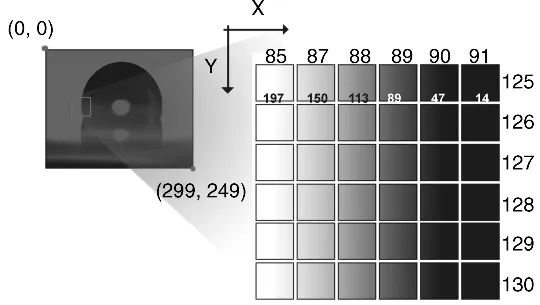
Figure 1.1 Grayscale image.
Each image pixel value is related to the brightness of the image at that specific location. For a given camera device, the maximum value recorded for the image pixels is generally related to a characteristic of the camera referred to as the bit depth. For example, if bit depth is k, then there will be as much as 2k levels of brightness that can be defined. For example, if the bit depth is 8 bits, then a pixel can have 256 values (28) in the range between 0 and 255.
A grayscale image pixel most often only has brightness information that can be represented in 8 bit values and as such the image is often referred to as an 8 bit image. If the pixel value is 0, then it is the most dark (black) image pixel, whereas a value of 255 means the brightest image (white) pixel. For a better understanding, Figure 1.1 shows a magnified portion of an image where the location range of X pixels is 85–91 and Y range is 125–130 within a total of 300 × 250 pixels in the image. In the case of pixel location of 85 along the X direction and 125 along the Y direction, the image pixel value is f(85, 125) = 197, which is closer to 255 than 0 and therefore is rendered closer to bright end of the image scale (white). On the other hand, the value of image pixel where X = 91 and Y = 125 is 14, which is close to 0 and thus relatively dark (black).
Due to its simple representation as single pixel values, grayscale images are often used in machine vision applications as a starting point to measure the length or size of an object and to find a similar image pattern via pattern matching. The gray images can be acquired from digital monochrome or color cameras. When the color image is acquired, the color image can easily be converted to a grayscale image by using the color plane extraction function that is provided by NI Vision Development Module.
1.1.2 Binary Image
The most commonly used image format for finding the existence of the object, location, and size information is binary image. The binary image pixel has two digit values, where object has the value of 1 and background has the value of 0 in most cases. Since there are only two values used, it is often called a 1 bit image (bit depth of 1, or 21). To make a binary image, the grayscale image is commonly used as a starting point. In general, we use a threshold value to convert a grayscale image to a binary image. In the case that the object of interest in an image is bright against a dark background (the imaged object's pixel value is larger than a chosen threshold value), it is classified as the object (a pixel image value of 1) and if the image value is less than the threshold value, it can be classified as the background (the pixel image value of 0). However, it should be noted that there will be cases where the dark parts of an image may represent the object with the bright part comprising the background.
Once the grayscale image is converted to a binary image, various image processing functions can be used. For example, we can use the particle analysis function from which the size, area, and the center of the object can be easily obtained. Prior to particle analysis, the morphology functions are often used to modify aspects of the image...
Table of contents
- Cover
- Related Titles
- Title Page
- Copyright
- About the Authors
- Preface
- Chapter 1: Basics of Machine Vision
- Chapter 2: Image Acquisition with LabVIEW
- Chapter 3: Particle Analysis
- Chapter 4: Edge Detection
- Chapter 5: Pattern Matching
- Chapter 6: Color Pattern Matching
- Chapter 7: Dimension Measurement
- Chapter 8: Dimension Measurement Using Coordinate System
- Chapter 9: Geometric Matching
- Chapter 10: Binary Shape Matching
- Chapter 11: OCR (Optical Character Recognition)
- Chapter 12: Binary Particle Classification
- Chapter 13: Contour Analysis
- Chapter 14: Image Calibration and Correction
- Chapter 15: Saving and Reading Images
- Chapter 16: AVI File Write and Read
- Chapter 17: Tracking
- Chapter 18: LabVIEW Machine Vision Applications*
- Chapter 19: Student Projects
- Index
- EULA
Trusted by 375,005 students
Access to over 1.5 million titles for a fair monthly price.
Study more efficiently using our study tools.
Frequently asked questions
Yes, you can cancel anytime from the Subscription tab in your account settings on the Perlego website. Your subscription will stay active until the end of your current billing period. Learn how to cancel your subscription
No, books cannot be downloaded as external files, such as PDFs, for use outside of Perlego. However, you can download books within the Perlego app for offline reading on mobile or tablet. Learn how to download books offline
Perlego offers two plans: Essential and Complete
- Essential is ideal for learners and professionals who enjoy exploring a wide range of subjects. Access the Essential Library with 800,000+ trusted titles and best-sellers across business, personal growth, and the humanities. Includes unlimited reading time and Standard Read Aloud voice.
- Complete: Perfect for advanced learners and researchers needing full, unrestricted access. Unlock 1.5M+ books across hundreds of subjects, including academic and specialized titles. The Complete Plan also includes advanced features like Premium Read Aloud and Research Assistant.
We are an online textbook subscription service, where you can get access to an entire online library for less than the price of a single book per month. With over 1.5 million books across 990+ topics, we’ve got you covered! Learn about our mission
Look out for the read-aloud symbol on your next book to see if you can listen to it. The read-aloud tool reads text aloud for you, highlighting the text as it is being read. You can pause it, speed it up and slow it down. Learn more about Read Aloud
Yes! You can use the Perlego app on both iOS and Android devices to read anytime, anywhere — even offline. Perfect for commutes or when you’re on the go.
Please note we cannot support devices running on iOS 13 and Android 7 or earlier. Learn more about using the app
Please note we cannot support devices running on iOS 13 and Android 7 or earlier. Learn more about using the app
Yes, you can access Practical Guide to Machine Vision Software by Kye-Si Kwon,Steven Ready in PDF and/or ePUB format, as well as other popular books in Computer Science & Computer Vision & Pattern Recognition. We have over 1.5 million books available in our catalogue for you to explore.