Adventures in Minecraft
eBook - ePub

Adventures in Minecraft

  1. English
  2. ePUB (mobile friendly)
  3. Available on iOS & Android
eBook - ePub

Adventures in Minecraft

About this book

Learn valuable programming skills while building your own Minecraft adventure!

If you love playing Minecraft and want to learn how to code and create your own mods, this book was designed just for you. Working within the game itself, you'll learn to set up and run your own local Minecraft server, interact with the game on PC, Mac and Raspberry Pi, and develop Python programming skills that apply way beyond Minecraft. You'll learn how to use coordinates, how to change the player's position, how to create and delete blocks and how to check when a block has been hit.

The adventures aren't limited to the virtual – you'll also learn how to connect Minecraft to a BBC micro: bit so your Minecraft world can sense and control objects in the real world! The companion website gives you access to tutorial videos to make sure you understand the book, starter kits to make setup simple, completed code files, and badges to collect for your accomplishments. Written specifically for young people by professional Minecraft geeks, this fun, easy-to-follow guide helps you expand Minecraft for more exciting adventures, and put your personal stamp on the world you create. Your own Minecraft world will be unlike anyone else's on the planet, and you'll pick up programming skills that will serve you for years to come on other devices and projects. Among other things, you will:

  • Write Minecraft programs in PythonÂŽ on your MacÂŽ, PC or Raspberry PiÂŽ
  • Build houses, structures, and make a 3D duplicating machine
  • Build intelligent objects and program an alien invasion
  • Build huge 2D and 3D structures like spheres and pyramids
  • Build a custom game controller using a BBC micro: bit™
  • Plan and write a complete interactive arena game

Adventures in Minecraft teaches you how to make your favourite game even better, while you learn to program by customizing your Minecraft journey.
Frequently asked questions

Yes, you can cancel anytime from the Subscription tab in your account settings on the Perlego website. Your subscription will stay active until the end of your current billing period. Learn how to cancel your subscription.
No, books cannot be downloaded as external files, such as PDFs, for use outside of Perlego. However, you can download books within the Perlego app for offline reading on mobile or tablet. Learn more here.
Perlego offers two plans: Essential and Complete
  • Essential is ideal for learners and professionals who enjoy exploring a wide range of subjects. Access the Essential Library with 800,000+ trusted titles and best-sellers across business, personal growth, and the humanities. Includes unlimited reading time and Standard Read Aloud voice.
  • Complete: Perfect for advanced learners and researchers needing full, unrestricted access. Unlock 1.4M+ books across hundreds of subjects, including academic and specialized titles. The Complete Plan also includes advanced features like Premium Read Aloud and Research Assistant.
Both plans are available with monthly, semester, or annual billing cycles.
We are an online textbook subscription service, where you can get access to an entire online library for less than the price of a single book per month. With over 1 million books across 1000+ topics, we’ve got you covered! Learn more here.
Look out for the read-aloud symbol on your next book to see if you can listen to it. The read-aloud tool reads text aloud for you, highlighting the text as it is being read. You can pause it, speed it up and slow it down. Learn more here.
Yes! You can use the Perlego app on both iOS or Android devices to read anytime, anywhere — even offline. Perfect for commutes or when you’re on the go.
Please note we cannot support devices running on iOS 13 and Android 7 or earlier. Learn more about using the app.
Yes, you can access Adventures in Minecraft by David Whale,Martin O'Hanlon in PDF and/or ePUB format, as well as other popular books in Computer Science & Hardware. We have over one million books available in our catalogue for you to explore.

Information

Publisher
Wiley
Year
2017
Print ISBN
9781119439585
eBook ISBN
9781119439554
image
THIS BOOK IS going to help you learn how to write programs or mods that interact with your Minecraft world, allowing you to do some very exciting things. You use a programming language called Python to do it. This way of controlling the Minecraft world from a Python program was first created for Minecraft: Pi Edition on the Raspberry Pi. If you don’t have a Raspberry Pi but have Minecraft for Windows or Apple Mac instead, that’s okay; you just need to do some extra work on the setup before you get started, which this adventure shows you how to do.
ImageD
Python is the programming language used in this book.
This book is full of adventures that teach you how to write programs for the Minecraft game. It’s packed with all sorts of things you can do with Minecraft to entertain your friends and make the game even more fun to play. You will discover some pretty flashy ways to move your player around, and before long you’ll be finding it easy to build whole cities and Minecraft creations that have never been seen before.
The Python programming language comes with a code editor called IDLE, which you will use to create, edit and run the programs you create in these adventures.
ImageD
The Python programming language is used throughout the world in business and education. It is extremely powerful but also easy to learn. You can find out more about Python at www.python.org/.
When computer programmers learn a new programming language or a new way of doing something, they always start by writing a “hello world” program. This is a really simple program that displays “hello world” on the screen, to make sure everything is installed and working properly.
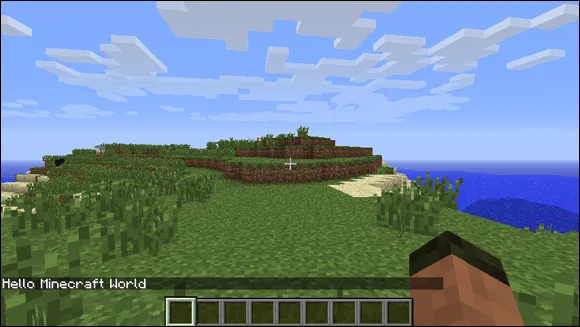
In this first adventure, you set up your computer to allow you to write a program that displays the text “Hello Minecraft World” on the Minecraft chat (see Figure 1-1).
image
FIGURE 1-1 Hello Minecraft World
To do the Minecraft programming in this book, you need one of these three types of computer: a PC running Microsoft Windows; an Apple Mac running macOS X; or a Raspberry Pi running Raspbian with Pixel. The way you set up your computer depends on which sort of computer you have but, once you have set it up, you program Minecraft in exactly the same way on all of them. To make it easier for you to set up your computer, you can download a starter kit from https://adventuresinminecraft.github.io. The starter kits have been tested to make sure all the adventures in this book work properly.
You’ll see that your starter kit contains a README file, which you should have a look at. It describes what the kit contains and how it was created; you could use this information to set up your own computer from scratch, although this is not recommended. You’ll get a lot more out of it by following the instructions in this book.
Make sure you follow the instructions for your type of computer, either “Setting Up Your Raspberry Pi for Programming Minecraft” or “Setting Up Your PC or Apple Mac for Programming Minecraft”.
ImageD
It’s essential that you to set up your computer correctly; otherwise you could get yourself into quite a muddle. So please make sure that you follow the instructions very carefully!

Setting Up Your Raspberry Pi to Program Minecraft

If you are using a Raspberry Pi, Minecraft is installed already; you just need to download the Raspberry Pi starter kit. Everything you need to complete Adventures in Minecraft is in a folder called MyAdventures. You also will save your Minecraft programs in this folder.
The Raspberry Pi’s graphical user interface (GUI), known as Pixel, is used throughout Adventures in Minecraft. The GUI is installed on Raspbian, but depending on how you have set up your Raspberry Pi, it may not load the GUI when it boots up. You may instead start with...

Table of contents

  1. Cover
  2. Title Page
  3. Table of Contents
  4. Foreword
  5. Introduction
  6. Adventure 1: Hello Minecraft World
  7. Adventure 2: Tracking Your Players as They Move
  8. Adventure 3: Building Anything Automatically
  9. Adventure 4: Interacting with Blocks
  10. Adventure 5: Using Data Files
  11. Adventure 6: Building 2D and 3D Structures
  12. Adventure 7: Giving Blocks a Mind of Their Own
  13. Adventure 8: Building a Game Controller with a BBC micro:bit
  14. Adventure 9: The Big Adventure: Crafty Crossing
  15. Appendix A: Where to Go from Here
  16. Appendix B: Quick Reference
  17. Glossary
  18. End User License Agreement