![]()
Part 1
Getting Started with Tinkercad
IN THIS PART …
Learn about 3D modeling, the modeling process, and various modeling techniques.
Get started with Tinkercad by creating a Tinkercad account, logging in and out of Tinkercad, and creating a Tinkercad design.
View recent designs, choose options and settings, find the help screens, and visit the Tinkercad Twitter page, gallery, and blog.
Explore the Tinkercad user interface and use the ViewCube, viewing tools, the Tinkercad grid, and keyboard shortcuts.
Explore the 3D tools in Tinkercad, including Copy and Paste, Duplicate, Hide, Show All, Group and Ungroup, Align, Flip, Workplane, Ruler, the Tinkercad Basic Shapes menu, and the Featured Shape Generators and Community Shape Generators.
![]()
Chapter 1
Exploring 3D Design
IN THIS CHAPTER
Discovering basic concepts of 3D design Looking at the 3D modeling process Comparing 3D and 2D methods In this chapter, you discover all things 3D so that you can understand the basic terminology and concepts of the 3D universe before you go rushing off to the world of Tinkercad.
What Is 3D Modeling?
3D is the abbreviation for 3-dimensional. In the world of Computer Aided Design (CAD), 3D modeling (also known as three-dimensional modeling) is the process or workflow of developing a computer-based (mathematical) model of any surface of an object, regardless of whether it’s inanimate (such as a gear wheel) or living (such as an animal or a human being).
3D modeling is done in three dimensions via specialized software and, in your case, Tinkercad. The end product is normally called a 3D model. Someone who works with 3D models may often be referred to as a 3D artist.
The 3D model has the advantage that it can be displayed on the computer screen as a two-dimensional image through a process called 3D rendering. For example, these images are often the uber-cool pictures you see in an architect’s slideshow of a new building or house he designed. They also may be used in a computer simulation of physical phenomena, such as virtual prototype testing to see whether the lighting makes a new product desirable to a given market.
The iPhone is a typical example where lighting is an important facet of the design to highlight all the lovely curves and bevels on the iPhone case. (Can you tell I’m an Apple fan?) The model can also be physically created using 3D printing devices, which is where Tinkercad comes into its own, with the ability to export 3D model files for 3D printing.
3D models may be created automatically or manually. The manual modeling process of preparing geometric data for 3D computer graphics is similar to plastic arts, such as sculpting. Now that does sound complicated, right? It’s not. The Tinkercad interface simplifies the manual 3D workflow, allowing you, the Tinkercad user, to manually create your 3D designs and take them all the way to 3D printing.
Tinkercad is classed as
3D modeling software, which is a class of 3D computer graphics software used to produce 3D models. Individual programs of this class are called
modeling applications or
modelers. Tinkercad is one of several 3D modeling applications or modelers that are provided by the San Francisco–based software company, Autodesk.
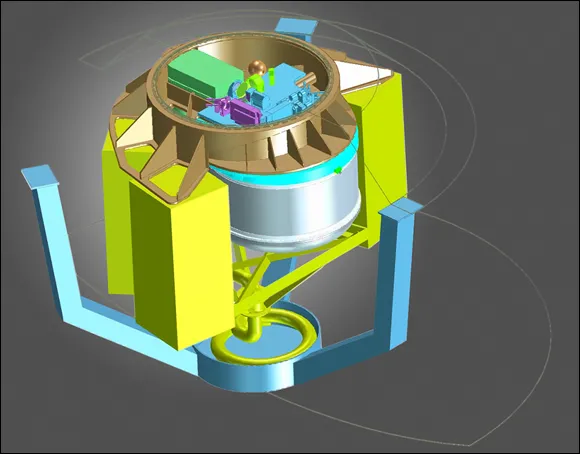
Figure 1-1 shows a typical example of 3D design.