Update the visual design of your course in pedagogically sound ways
Visual Design for Online Learning spotlights the role that visual elements play in the online learning environment. Written for both new and experienced instructors, the book guides you in adding pedagogically relevant visual design elements that contribute to effective learning practices. The text builds upon three conceptual frameworks: active learning, multiple intelligences, and universal design for learning. This resource explores critical issues such as copyright, technology tools, and accessibility and includes examples from top Blackboard practitioners which are applicable to any LMS. Ultimately, the author guides you in developing effective visual elements that will support your teaching goals while reinforcing the learning materials you share with your students.
There has been a steady increase of over 10% in online enrollment for higher education institutions since 2002, yet the visual look of online courses has not changed significantly in the last ten years. Adapting to the needs of students within online classes is critical to guiding your students toward success—and the right visual elements can play an integral role in your students' ability to learn and retain the information they need to thrive in their chosen programs. In fact, visual elements have been shown to increase student participation, engagement, and success in an online course.
Leverage the best practices employed by exemplary Blackboard practitioners
Explore three foundational conceptual frameworks: active learning, multiple intelligences, and universal design for learning
Increase student retention and success
Visual Design for Online Learning is an essential reference for all online educators—both new and experienced.
I strive for two things in design: simplicity and clarity. —Lindon Leader
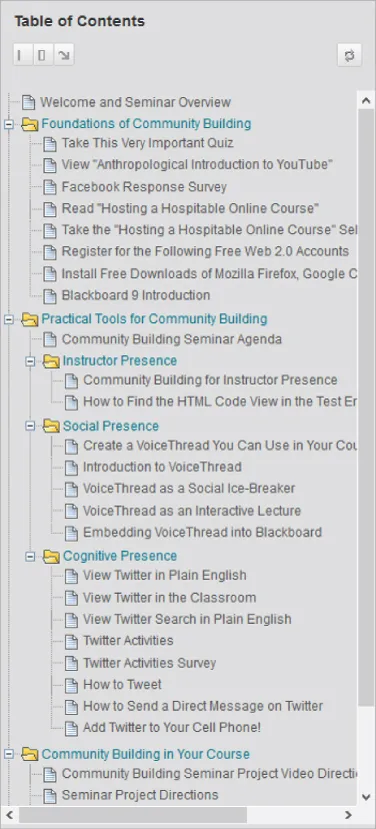
Don't do what I did! When I was a new instructional designer, I had the opportunity to collaborate with our academic administrative team to develop faculty workshops for teaching online. Initially those workshops were offered face-to-face, and we covered major topics like community building, course design, teaching techniques, and assessment. As our faculty grew and adjunct instructors were located farther away from our main campus, the academic administrative team began to consider blended and fully online workshop options. When I began to redesign the face-to-face course for fully online delivery, I wanted to make sure that faculty taking the workshops online, received the same benefit of our team's experiences as if we were all training together in a classroom. So I included in the redesign everything (and I do mean everything) we had shared in the face-to-face training. As a result, the first version of the online course looked like Figure 1.1. Folders contained folders that contained several content items and additional folders. Faculty practically needed to memorize the organizational scheme to find any one content item of interest. As the course developer, even I could not recall the organizational scheme I had created when I needed to direct faculty to a specific content item. Simplicity and clarity are important aims for designers in any field—and Figure 1.1 falls short of both aims.
Figure 1.1 Too many technologies with excessive amounts of content take the focus away from course learning outcomes
To use a colloquial expression common among United States southerners, the course excerpt in Figure 1.1 is a “hot mess”! A hot mess describes anything in a state of extreme disorder or disarray. I don't mind poking fun at my earlier course design attempts. We all start somewhere, and I was very proud of that hot mess after I built it. At that time, I was simultaneously learning the features of Blackboard, my institution's learning management system, and providing support to faculty as they taught and built courses online. So why would I say the example in Figure 1.1 is a hot M.E.S.S.? Four reasons:
Many new technologies were rapidly thrust upon faculty in a short time span. This inadvertently drew the focus away from the learning objectives. Frustration set in as faculty attempted to use the technologies for the first time, navigate many content folders to locate needed resources, and apply the content.
Excessive amounts of nice-to-know content flooded the course. Nice-to-know content is content that is not directly related to learning objectives. There is a vast amount of information available on any given topic. As course designers and developers, it's our responsibility to vet the information and use our professional judgment to select the one, two, or three resources that will best help a learner attain the desired outcomes of the course.
Several related content items were created as individual resources. Creating individual content items for related resources can overwhelm learners with volumes of content and waste valuable study time with unnecessary clicks and page loading time.
Supplemental resources mixed with required resources makes it difficult to differentiate important content from optional content. Label supplemental resources as optional so that learners can prioritize the resources needed to attain learning outcomes.
When all four of these issues are present in a content folder, learning module, or course, we take the focus away from course learning outcomes. Combined, these issues thwart development of any sense of learner self-efficacy by raising anxiety that hinders meaning making and creating clutter that steals time away from the learning task. This threaten retention and course completion by overwhelming students, particularly those who may be adjusting to learning online.
While I achieved my goal of packing into the course everything I thought we shared in the face-to-face training, I also guaranteed that faculty wouldn't be able to find any one thing for which they might be looking. Faculty trying to find a piece of content probably got the same knot in their stomach that I get when I'm looking for a specific item in the garage that has been packed away for a couple of years. Although the boxes in the garage are clearly labeled, I can never remember where one specific item is located. That is exactly what happened in the first few online workshops I designed for faculty. When faculty asked which folder a specific item was in, sometimes I couldn't remember. This can happen when there is a high “folder depth ratio.” A high folder depth ratio occurs when content folders are nested in several layers of additional content folders. So the first thing I learned about course design was to keep the design light. To do this, I had to accept that online teaching is different from teaching face-to-face in a classroom—not better or worse, just different. While both delivery formats can offer high-quality content, interactions, and collaboration, they differ in how it's done. Both delivery formats can be rigorous and challenging but differ in the techniques and tools used to achieve the same end. Therefore, there is no need to fill the online space with an abundance of content and information. Instead, the goal is to design the online climate so that the opportunity for quality instruction, peer interactions and collaboration, rigor, and challenge is the same as in face-to-face classroom instruction.
So the question now becomes, how do you design an online environment where there are opportunities for quality instruction, peer interactions, collaboration, rigor, and challenge without opening the floodgates of massive amounts of content nested three and four folders deep? My suggestion: keep the course design light. Imagine the feeling you have when a burden has been lifted, a challenge has been surmounted, or a conflict is resolved—that light feeling you get when tension has been released through exercise, prayer, a massage, or a relaxing evening doing what you love to do. Learning something new or pursuing a goal come with tensions as you wrestle with new concepts. However, tensions shouldn't come from an abundance of material that hasn't been vetted properly. Tensions shouldn't come from not being able to find the resources you need to achieve what is expected. Tensions shouldn't come from the technology itself.
Keeping the course design light will help avoid the hot mess in Figure 1.1. What does it mean to keep a course light? First, the content presented is focused on specific objectives based on what you want the learner to do or consider at the conclusion of the course. The course navigation keeps the learner within a few clicks of any resource needed. Second, the learning technologies used are explained, supported, and kept to a minimum. The more technologies students are expected to use, the more content is required to explain and support the technologies used. Keeping the course design light facilitates a focus on learning outcomes, as follows:
Reducing the number of new technologies integrated into the course increases familiarity with required technologies, leaving students more mental energy for synthesizing course content.
Purging excessive amounts of content, whether assignments or resources, helps students manage their time on task.
Merging related content items contributes to a lower folder depth ratio, so students can more easily find what they need when they need it.
Separating required resources from optional resources focuses the learners' attention on the resources directly related to attaining learning objectives.
With that in mind, I'd like to highlight four basic technology skills that will facilitate a light course design. Using the acronym L.I.T.E. will help us to remember them. These foundational skills will be developed in the remaining chapters:
Links—Create clickable links to external content.
Integrate multimedia—Merge similar or related text, video, audio, still images, graphics, animation, hypermedia, simulations, and other types of interactive objects.
Typography—Enhance readability and legibility by using fonts, font size, bullets, numbering, and line spacing to create white space.
Embed—Display content at the point of need.
Keeping the design L.I.T.E. prevents a M.E.S.S. and also complements the Universal Design for Learning (UDL) framework, when applied to courses designed in a learning management system or website. The UDL framework advocates making content accessible...
Table of contents
Cover
Title Page
Copyright
Table of Contents
Dedication
Preface
Acknowledgments
About the Author
Chapter 1: How Do I Begin?
Chapter 2: How Do I Include Images and Video?
Chapter 3: How Do I Facilitate Instruction and Interaction?
Chapter 4: How Do I Integrate Multimedia?
Chapter 5: How Do I Visually Design a Course?
Chapter 6: How Do I Support Learners Online?
Appendix A: Syllabus Review Script
Appendix B: Course Welcome and Orientation Script
References
Index
End User License Agreement
Trusted by 375,005 students
Access to over 1.5 million titles for a fair monthly price.
Study more efficiently using our study tools.
Frequently asked questions
Yes, you can cancel anytime from the Subscription tab in your account settings on the Perlego website. Your subscription will stay active until the end of your current billing period. Learn how to cancel your subscription
No, books cannot be downloaded as external files, such as PDFs, for use outside of Perlego. However, you can download books within the Perlego app for offline reading on mobile or tablet. Learn how to download books offline
Perlego offers two plans: Essential and Complete
Essential is ideal for learners and professionals who enjoy exploring a wide range of subjects. Access the Essential Library with 800,000+ trusted titles and best-sellers across business, personal growth, and the humanities. Includes unlimited reading time and Standard Read Aloud voice.
Complete: Perfect for advanced learners and researchers needing full, unrestricted access. Unlock 1.5M+ books across hundreds of subjects, including academic and specialized titles. The Complete Plan also includes advanced features like Premium Read Aloud and Research Assistant.
Both plans are available with monthly, semester, or annual billing cycles.
We are an online textbook subscription service, where you can get access to an entire online library for less than the price of a single book per month. With over 1.5 million books across 990+ topics, we’ve got you covered! Learn about our mission
Look out for the read-aloud symbol on your next book to see if you can listen to it. The read-aloud tool reads text aloud for you, highlighting the text as it is being read. You can pause it, speed it up and slow it down. Learn more about Read Aloud
Yes! You can use the Perlego app on both iOS and Android devices to read anytime, anywhere — even offline. Perfect for commutes or when you’re on the go. Please note we cannot support devices running on iOS 13 and Android 7 or earlier. Learn more about using the app
Yes, you can access Visual Design for Online Learning by Torria Davis in PDF and/or ePUB format, as well as other popular books in Education & Inclusive Education. We have over 1.5 million books available in our catalogue for you to explore.