Beginning Java Programming
eBook - ePub

Beginning Java Programming

The Object-Oriented Approach

  1. English
  2. ePUB (mobile friendly)
  3. Available on iOS & Android
eBook - ePub

Beginning Java Programming

The Object-Oriented Approach

About this book

A comprehensive Java guide, with samples, exercises, case studies, and step-by-step instruction

Beginning Java Programming: The Object Oriented Approach is a straightforward resource for getting started with one of the world's most enduringly popular programming languages. Based on classes taught by the authors, the book starts with the basics and gradually builds into more advanced concepts. The approach utilizes an integrated development environment that allows readers to immediately apply what they learn, and includes step-by-step instruction with plenty of sample programs. Each chapter contains exercises based on real-world business and educational scenarios, and the final chapter uses case studies to combine several concepts and put readers' new skills to the test.

Beginning Java Programming: The Object Oriented Approach provides both the information and the tools beginners need to develop Java skills, from the general concepts of object-oriented programming. Learn to:

  • Understand the Java language and object-oriented concept implementation
  • Use Java to access and manipulate external data
  • Make applications accessible to users with GUIs
  • Streamline workflow with object-oriented patterns

The book is geared for those who want to use Java in an applied environment while learning at the same time. Useful as either a course text or a stand-alone self-study program, Beginning Java Programming is a thorough, comprehensive guide.
Frequently asked questions

Yes, you can cancel anytime from the Subscription tab in your account settings on the Perlego website. Your subscription will stay active until the end of your current billing period. Learn how to cancel your subscription.
No, books cannot be downloaded as external files, such as PDFs, for use outside of Perlego. However, you can download books within the Perlego app for offline reading on mobile or tablet. Learn more here.
Perlego offers two plans: Essential and Complete
  • Essential is ideal for learners and professionals who enjoy exploring a wide range of subjects. Access the Essential Library with 800,000+ trusted titles and best-sellers across business, personal growth, and the humanities. Includes unlimited reading time and Standard Read Aloud voice.
  • Complete: Perfect for advanced learners and researchers needing full, unrestricted access. Unlock 1.4M+ books across hundreds of subjects, including academic and specialized titles. The Complete Plan also includes advanced features like Premium Read Aloud and Research Assistant.
Both plans are available with monthly, semester, or annual billing cycles.
We are an online textbook subscription service, where you can get access to an entire online library for less than the price of a single book per month. With over 1 million books across 1000+ topics, we’ve got you covered! Learn more here.
Look out for the read-aloud symbol on your next book to see if you can listen to it. The read-aloud tool reads text aloud for you, highlighting the text as it is being read. You can pause it, speed it up and slow it down. Learn more here.
Yes! You can use the Perlego app on both iOS or Android devices to read anytime, anywhere — even offline. Perfect for commutes or when you’re on the go.
Please note we cannot support devices running on iOS 13 and Android 7 or earlier. Learn more about using the app.
Yes, you can access Beginning Java Programming by Bart Baesens,Aimee Backiel,Seppe vanden Broucke in PDF and/or ePUB format, as well as other popular books in Computer Science & Object Oriented Programming. We have over one million books available in our catalogue for you to explore.

Information

1
A General Introduction to Programming

WHAT YOU WILL LEARN IN THIS CHAPTER:
  • The key steps in a programming process
  • The different types of programming errors
  • The key principles of software testing
  • The different types of software maintenance
  • The key principles of structured programming
WROX.COM CODE DOWNLOADS FOR THIS CHAPTER
The wrox.com code downloads for this chapter are found at www.wrox.com/go/beginningjavaprogramming on the Download Code tab. The code is in the Chapter 1 download and individually named according to the names throughout the chapter.
Developing good and correct software is a very important challenge in today’s business environment. Given the ubiquity and pervasiveness of software programs into our daily lives, the impact of faulty software is now bigger than ever. Software errors have caused flight crashes, rocket launch errors, and power blackouts, to name a few examples. Hence, it is important to design high-quality, error-free software programs. This chapter covers the fundamental concepts of programming. First, it elaborates on the programming process. The next section provides a sneak preview of object-oriented programming. This is followed by a short discussion on programming errors. The basic principles of software testing and software maintenance are also discussed. The chapter concludes by giving some recommendations relating to structured programming. You will revisit many of these ideas in future chapters, with a more hands-on approach.

THE PROGRAMMING PROCESS

A program (also referred to as an application) is a set of instructions targeted to solve a particular problem that can be unambiguously understood by a computer. To this end, the computer will translate the program to the language it understands, which is machine language consisting of 0s and 1s. Computers execute a program literally as it was programmed, nothing more and nothing less. Programming is the activity of writing or coding a program in a particular programming language. This is a language that has strict grammar and syntax rules, symbols, and special keywords. People who write programs are commonly referred to as programmers or application developers. The term software then refers to a set of programs within a particular business context.
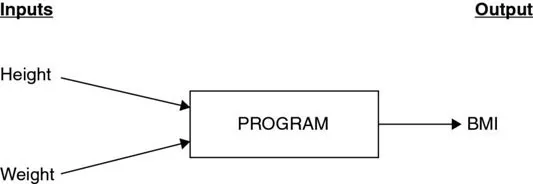
An example of a programming exercise is a program that calculates the body mass index (BMI) of a person. The BMI is calculated by dividing a person’s weight in kilograms by the square of his or her height in meters. A person is considered overweight if his or her BMI is over 25. A BMI calculator program then requires the weight and height as inputs and calculates the associated BMI as the output. This is illustrated in Figure 1.1. This BMI example is used to demonstrate the steps in the software development cycle.
images
Figure 1.1
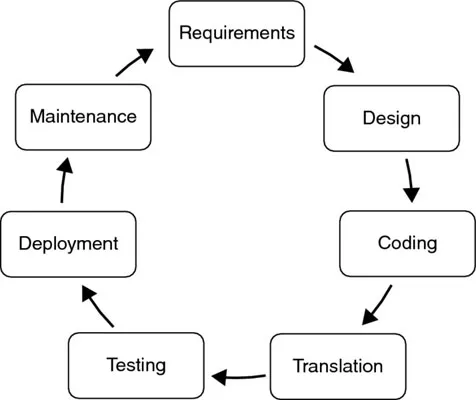
Programs are typically written using a step-by-step approach, as follows:
  1. Requirements gathering and analysis
  2. Program design
  3. Program coding
  4. Translation to machine language
  5. Testing and debugging
  6. Deployment
  7. Maintenance
Because our environment is continuously evolving, software, too, is often continually reviewed and adapted. Therefore, these steps are often represented as a cycle, as shown in Figure 1.2, rather than as a ladder.
images
Figure 1.2
The first step is to make sure you understand the problem in sufficient detail. This means analyzing the problem statement carefully so you fully grasp all the requirements that need to be fulfilled by the software program. This may involve Q&A sessions, interviews, and surveys with business experts who have the necessary subject matter expertise. Even if you are programming for yourself, taking the time upfront to consider all the demands you want your program to meet will limit the amount of changes required later in the process. At the end of this step, it is important to know what the input to the program will receive and what output it should give. In the BMI example, you will need to know whether the height will be measured in meters or feet and the weight in kilos or pounds. You would also want to determine whether the output should be just the BMI results or also a message stating whether or not the person is overweight.
Once you have a thorough understanding of the business problem, you can start thinking about ways to solve it using a computer program. In other words, which processing steps should take place on the input(s) in order to give the desired output(s)? The procedure needed to solve the problem is also often referred to as the algorithm. When working out an algorithm, common sense and creativity both play an important role. A first useful step in designing an algorithm is planning the application logic using pseudo-code or flowcharts. Pseudo-code is a type of structured English but without strict grammar rules. It is a user-friendly way of representing application logic in a sequential, readable format. It allows the problem statement to be broken into manageable pieces in order to reduce its complexity. Following is an example of pseudo-code for the BMI case. A flowchart represents the application in a diagram, whereby the boxes show the activities and the arrows the sequences between them. Table 1.1 presents an overview of the most important flowchart construction concepts. Figure 1.3 then gives an example of a flowchart for the BMI case. Both pseudo-code and flowcharts can be used concurrently to facilitate the programming exercise. A key advantage of flowcharts when compared to pseudo-code is that they are visual and thus easier to interpret.
Table 1.1 Key Flowchart Modeling Concepts
FLOWCHART SYMBOL MEANING
images
A terminator shows the start and stopping points of the program.
images
An arrow shows the direction of the process flow.
images
A rectangle represents a process step or activity.
images
A diamond indicates a decision point in the process.
images
This symbol represents a document or report.
images
This rhombus represents data used as inputs/outputs to/from a process.
images
This cylinder represen...

Table of contents

  1. COVER
  2. INTRODUCTION
  3. 1 A GENERAL INTRODUCTION TO PROGRAMMING
  4. 2 GETTING TO KNOW JAVA
  5. 3 SETTING UP YOUR DEVELOPMENT ENVIRONMENT
  6. 4 MOVING TOWARD OBJECT-ORIENTED PROGRAMMING
  7. 5 CONTROLLING THE FLOW OF YOUR PROGRAM
  8. 6 HANDLING EXCEPTIONS AND DEBUGGING
  9. 7 DELVING FURTHER INTO OBJECT-ORIENTED CONCEPTS
  10. 8 HANDLING INPUT AND OUTPUT
  11. 9 WORKING WITH DATABASES IN JAVA
  12. 10 ACCESSING WEB SOURCES
  13. 11 DESIGNING GRAPHICAL INTERFACES
  14. 12 USING OBJECT-ORIENTED PATTERNS
  15. TITLE PAGE
  16. COPYRIGHT
  17. DEDICATION
  18. ABOUT THE AUTHORS
  19. CREDITS
  20. ACKNOWLEDGMENTS
  21. ADVERT
  22. EULA