Leverage the integration of SQL Server and Office for more effective BI
Applied Microsoft Business Intelligence shows you how to leverage the complete set of Microsoft tools—including Microsoft Office and SQL Server—to better analyze business data.
This book provides best practices for building complete BI solutions using the full Microsoft toolset. You will learn how to effectively use SQL Server Analysis and Reporting Services, along with Excel, SharePoint, and other tools to provide effective and cohesive solutions for the enterprise. Coverage includes BI architecture, data queries, semantic models, multidimensional modeling, data analysis and visualization, performance monitoring, data mining, and more, to help you learn to perform practical business analysis and reporting. Written by an author team that includes a key member of the BI product team at Microsoft, this useful reference provides expert instruction for more effective use of the Microsoft BI toolset.
Use Microsoft BI suite cohesively for more effective enterprise solutions
Search, analyze, and visualize data more efficiently and completely
Develop flexible and scalable tabular and multidimensional models
Monitor performance, build a BI portal, and deploy and manage the BI Solution
Part I Overview of the Microsoft Business Intelligence Toolset
In This Part
Chapter 1: Which Analysis and Reporting Tools Do You Need?
Chapter 2: Designing an Effective Business Intelligence Architecture
Chapter 3: Selecting the Data Architecture that Fits Your Organization
Chapter 1 Which Analysis and Reporting Tools Do You Need?
When embarking on a business intelligence (BI) project, you should consider several things. Should a centralized data warehouse be built or can the existing operational database act as the source for business intelligence? Once that hurdle has been leaped, the next question is: Should time be spent building a semantic model (cube) or again back to the original question: Can the existing operational database act as the source for business intelligence? Finally, once you've answered those questions, you need to decide how to deliver the data to end users. In other words, which reporting tool will be used? The focus throughout this book is on selecting, designing, and delivering a business intelligence solution based on the Microsoft business intelligence tools stack.
Regardless of the approach, you must make a decision concerning which tools to use to ultimately deliver the business intelligence solution. If a data warehouse is built, which Relational Database Management System (RDBMS) will store the data? Now that you have a data warehouse, is a cube or semantic model needed? If so, which type of model should you use: Power Pivot, tabular, or multidimensional? You then need to determine if the solution offers self-service reporting and/or operational reporting capabilities.
Selecting a SQL Server Database Engine
After all the politics have been hashed out, the first step in your business intelligence solution is identifying the data sources. In most scenarios, the solution will include a plethora of data sources, ranging from flat files to relational databases. After that, you must build an Extraction, Transformation, and Loading (ETL) system, which centralizes that data into a data warehouse. The data warehouse is typically housed on an RDBMS.
Building a Data Warehouse
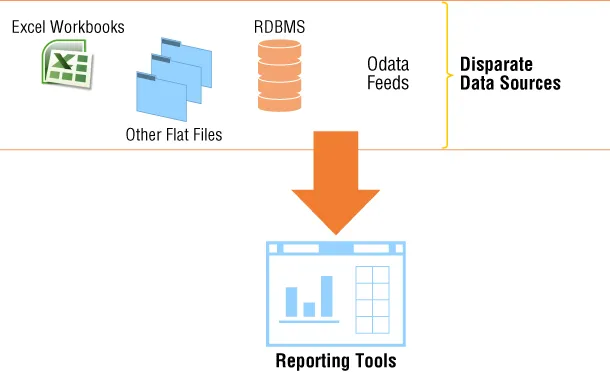
A valid argument could be made against building a data warehouse. However, you should consider whether you prefer to report against a centralized, single-source pristine dataset or to report against multiple, disparate questionable data sources. In other words, are reports more effective leveraging data that is definitely accurate or possibly inaccurate? Another thing to consider is the responsiveness of the business intelligence solution without centralizing the data into a single repository. Often, organizations attempt to analyze data directly against source data and quickly realize that, even though simple, this approach is not efficient nor effective. Figure 1.1 shows a sample topology of this solution.
Figure 1.1 Reporting against disparate data sources
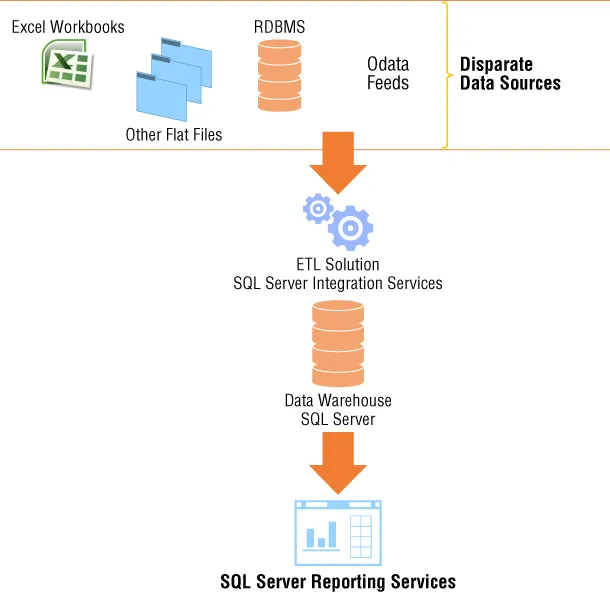
As a result, most organizations often decide to build a data warehouse. Figure 1.2 depicts a sample of a business intelligence solution that includes a data warehouse. Notice in this figure that instead of attempting to build reports against multiple data sources, a single source is used.
Figure 1.2 Business intelligence solution that includes ETL solution and data warehouse
Selecting an RDBMS
Once you've built a data warehouse, the next step is to select an RDBMS. The market for RDBMS systems has a wide range of choices. Selecting the correct system depends on several factors: number of users, disk space, data size, rate of growth, and frequency of data load to mention a few. Microsoft's RDBMS—SQL Server—includes several features that make it one of the more appealing systems available on the market. As of the writing of this book, SQL Server includes an in-memory Columnstore index which is designed specifically for data warehousing workloads. When included in the data warehouse design, you can achieve significant query performance and data compression. Another feature, Change Data Capture (CDC), assists in minimizing the amount of time required to load the data warehouse by providing mechanisms that detect inserts, updates, and deletes. These two features alone make SQL Server a viable Database Management System for hosting your data warehouse.
Selecting SQL Server Analysis Services
Now that a database engine is selected to host the data warehouse, the decision to build an analytical model or, in the case of a Microsoft Solution, semantic model must be made. With the latest release of SQL Server, semantic models have three choices from which you can select:
Power Pivot
Tabular
Multidimensional
So not only must you decide how to build a semantic model, but also which model to use.
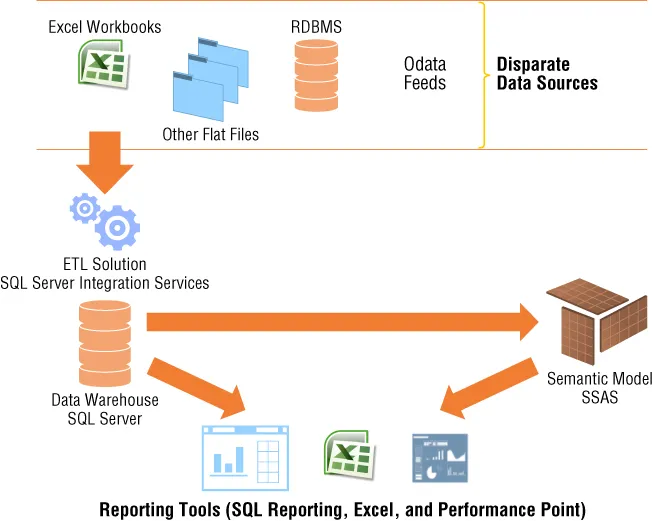
If the business intelligence solution requires very fast response times, ad-hoc capabilities, or predictive analytics, leveraging SQL Server Analysis Services (SSAS) is a great option. Whereas the aforementioned list is not inclusive of all factors that may drive the need for a semantic model, they definitely make a strong case in favor of it. SSAS offers a wide range of capabilities that assist in streamlining and reducing report requests, centralizing analytical formulas and key performance indicators, and—probably one of the more important robust capabilities—intuitively handling security at different levels. Figure 1.3 illustrates a business intelligence solution that includes a semantic model. Notice how the reporting tools are expanded when you compare them with Figure 1.2.
Figure 1.3 Business intelligence solution that includes SSAS semantic model
Although it is possible to report directly against a data warehouse using Excel and Performance Point (discussed later in the chapter), SSAS provides a more innate design experience with these tools. In addition, using SSAS provides end users with a larger surface of self-service capabilities that are unavailable when only a data warehouse is available. Therefore, they are excluded from Figure 1.2, but included in Figure 1.3.
For example, if you are the CEO of a company, you may require access to every aspect of data in the model. However, if you are a regional or departmental manager, you may only require access to data that is pertinent to your region or department. SSAS includes built-in capabilities that let you control access to data at the row level. In many cases, this is one of the most important and often overlooked requirements of a business intelligence solution. During most projects, you don't realize this until very late in the development process. However, when using SSAS, the implementation process is neither very difficult nor disruptive.
Working with SQL Server Reporting Services
Up to this point, all the data discussions have involved movement, transformation, and management of data. This section shifts to more data visualization and interactivity. Once the processes to implement the data warehouse and/or the semantic model are in place, your next decision is ho...
Table of contents
Cover
Table of Contents
Introduction
Part I: Overview of the Microsoft Business Intelligence Toolset
Part II: Business Intelligence for Analysis
Part III: Business Intelligence for Reporting
Part IV: Deploying and Managing the Business Intelligence Solution
End User License Agreement
Trusted by 375,005 students
Access to over 1.5 million titles for a fair monthly price.
Study more efficiently using our study tools.
Frequently asked questions
Yes, you can cancel anytime from the Subscription tab in your account settings on the Perlego website. Your subscription will stay active until the end of your current billing period. Learn how to cancel your subscription
No, books cannot be downloaded as external files, such as PDFs, for use outside of Perlego. However, you can download books within the Perlego app for offline reading on mobile or tablet. Learn how to download books offline
Perlego offers two plans: Essential and Complete
Essential is ideal for learners and professionals who enjoy exploring a wide range of subjects. Access the Essential Library with 800,000+ trusted titles and best-sellers across business, personal growth, and the humanities. Includes unlimited reading time and Standard Read Aloud voice.
Complete: Perfect for advanced learners and researchers needing full, unrestricted access. Unlock 1.5M+ books across hundreds of subjects, including academic and specialized titles. The Complete Plan also includes advanced features like Premium Read Aloud and Research Assistant.
Both plans are available with monthly, semester, or annual billing cycles.
We are an online textbook subscription service, where you can get access to an entire online library for less than the price of a single book per month. With over 1.5 million books across 990+ topics, we’ve got you covered! Learn about our mission
Look out for the read-aloud symbol on your next book to see if you can listen to it. The read-aloud tool reads text aloud for you, highlighting the text as it is being read. You can pause it, speed it up and slow it down. Learn more about Read Aloud
Yes! You can use the Perlego app on both iOS and Android devices to read anytime, anywhere — even offline. Perfect for commutes or when you’re on the go. Please note we cannot support devices running on iOS 13 and Android 7 or earlier. Learn more about using the app
Yes, you can access Applied Microsoft Business Intelligence by Patrick LeBlanc,Jessica M. Moss,Dejan Sarka,Dustin Ryan in PDF and/or ePUB format, as well as other popular books in Computer Science & Data Warehousing. We have over 1.5 million books available in our catalogue for you to explore.