Minecraft For Dummies
eBook - ePub

Minecraft For Dummies

  1. English
  2. ePUB (mobile friendly)
  3. Available on iOS & Android
eBook - ePub

Minecraft For Dummies

About this book

Don't be a Minecraft tourist – get expert tips and advice in this full-color primer

Minecraft For Dummies is the complete guide to playing within the Minecraft world. With easy-to-follow guidance from a team of Minecraft experts, you'll develop programming and engineering skills as you build amazing creations using in-game blocks and mechanical devices. Whether you prefer the PC, console, or portable platform, this helpful guide will walk you through the process of setting up and beginning gameplay, and engage with other users from all around the globe. With this trusty guidebook in hand, you'll navigate the infinite world of Minecraft with confidence, skills, and a storehouse of expert advice.

Minecraft is the sandbox construction game that has become a mainstream phenomenon with over a hundred million players. A virtually infinite world and versatile style of play offer endless possibilities for both the hardcore gamer and the total noob, and Minecraft For Dummies shows you everything you need to know before you break your first block.

  • Choose your platform, download the game, and play in all three modes
  • Gather resources, place and break blocks, and use circuits and logic gates
  • Defend your creations against spiders, skeletons, zombies, and the Creeper
  • Travel across the biomes and defeat the enderdragon to win the game

Whether you play to win or just like to explore, there is a style of Minecraft that will spark your imagination. Create or destroy, make war or peace, attack or defend – the game is whatever you want it to be. If you're ready to leave your mark on this digital universe, Minecraft For Dummies is the primer you need to get up to speed.

Frequently asked questions

Yes, you can cancel anytime from the Subscription tab in your account settings on the Perlego website. Your subscription will stay active until the end of your current billing period. Learn how to cancel your subscription.
No, books cannot be downloaded as external files, such as PDFs, for use outside of Perlego. However, you can download books within the Perlego app for offline reading on mobile or tablet. Learn more here.
Perlego offers two plans: Essential and Complete
  • Essential is ideal for learners and professionals who enjoy exploring a wide range of subjects. Access the Essential Library with 800,000+ trusted titles and best-sellers across business, personal growth, and the humanities. Includes unlimited reading time and Standard Read Aloud voice.
  • Complete: Perfect for advanced learners and researchers needing full, unrestricted access. Unlock 1.4M+ books across hundreds of subjects, including academic and specialized titles. The Complete Plan also includes advanced features like Premium Read Aloud and Research Assistant.
Both plans are available with monthly, semester, or annual billing cycles.
We are an online textbook subscription service, where you can get access to an entire online library for less than the price of a single book per month. With over 1 million books across 1000+ topics, we’ve got you covered! Learn more here.
Look out for the read-aloud symbol on your next book to see if you can listen to it. The read-aloud tool reads text aloud for you, highlighting the text as it is being read. You can pause it, speed it up and slow it down. Learn more here.
Yes! You can use the Perlego app on both iOS or Android devices to read anytime, anywhere — even offline. Perfect for commutes or when you’re on the go.
Please note we cannot support devices running on iOS 13 and Android 7 or earlier. Learn more about using the app.
Yes, you can access Minecraft For Dummies by Jesse Stay,Thomas Stay,Jacob Cordeiro in PDF and/or ePUB format, as well as other popular books in Computer Science & Programming Games. We have over one million books available in our catalogue for you to explore.

Information

Part I

Getting Started with Minecraft

9781118968239-pp0101.tif
webextras.eps
Visit www.dummies.com for more great For Dummies content online.
In this part …
  • Understand the world of Minecraft
  • Start your first game
  • Survive your first night
Chapter 1

Entering Minecraft

In This Chapter
arrow
Understanding Minecraft
arrow
Registering your account
arrow
Buying and downloading Minecraft
arrow
Starting your first game
arrow
Recognizing the basic controls
You’re ready to build, fight, create, craft, and brew. But how do you begin? This chapter tells you how to register and begin your first game.
tip.eps
If you’re a PE player (PE stands for Pocket Edition, the version of Minecraft for mobile devices), skip to the end of each chapter in this book to find a special section written just for you. In this chapter, PE players can find out how to download the game and understand its unique basic controls.

Getting to Know Minecraft

Minecraft is taking the world by storm! These days it’s hard to be a gamer without hearing or coming across the Minecraft brand — in fact, as of this writing Minecraft is the second most-played game right behind Wii Play, which just so happens to ship with the consoles it ships with. Parents and kids alike can’t avoid the game.
Minecraft is a massive adventure you can play on your own, or with your friends. The adventure encourages exploration and “mining” of the resources you need to build your world. As you play, there are monsters, zombies, and even dangerous animals that can hurt you along the way. You have to keep yourself fed and nourished in order to stay strong. In so many ways, it mimics real life.
There is so much to learn in this game — from geology to architecture, to farming, nutrition, and even electronics, engineering, and logic, you’ll find yourself learning throughout your adventures. Keep exploring, and the more you learn, the more cool things you’ll be able to build.
The game is playable on both mobile and desktop. You’ll probably find yourself, as a true player, exploring both of them at some point. The desktop version allows you to explore and do the most, but mobile is the cheapest and most widely available version to play. Spend time in each to learn new and different things you can do in them.

Registering a Minecraft Account

To jump into the action, you first have to register a Minecraft account. Then you can play in Demo mode or upgrade to a Premium account, which you need for the full version. Follow these steps to register an account:
  1. Go to http://minecraft.net.
    The Minecraft home page opens.
  2. Click the Register link in the upper right corner of the page.
    The Register New Mojang Account page appears.
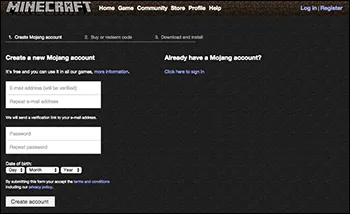
  3. Fill out all information requested in the text boxes, specify your date of birth, and answer the security questions (see Figure 1-1).
  4. Click the Register button to finish.
    9781118968239-fg0101.tif
    Figure 1-1: The registration page.
  5. Check the email account you entered for a verification message from Minecraft.
  6. Click the link provided in the email to complete the registration.
    Check out the next section to find out how to purchase the game.

Purchasing and Installing Minecraft

To buy and install the game, log in to your account at http://minecraft.net. (See the preceding section for details on registering.) Then follow these steps:
  1. Click the large Buy Now or Get Minecraft button on the home page.
    The Minecraft Store page opens. This interface changes often, so the exact wording can also change as you read this.
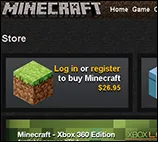
  2. Select the option to login or register for Minecraft (it might also say “Get Minecraft,” but the interface changes often), as shown in Figure 1-2.
    At the time of this writing, the game cost $26.95.
    tip.eps
    If you can’t click the button, you may not be logged in (or you may have already bought the game).
    9781118968239-fg0102.tif
    Figure 1-2: Buying the game.
  3. Fill out the payment information, and then click the Proceed to Checkout button.
  4. Follow the necessary steps to complete the purchase.
  5. Return to the Minecraft home page. On the right side of the screen, the large Buy Now button should now be labeled Download Now. Click this button to open the Download page.
Table of contents

  1. Cover
  2. Title Page
  3. Table of Contents
  4. Introduction
  5. Part I: Getting Started with Minecraft
  6. Part II: Learning the Basic Skills
  7. Part III: Mastering Techniques
  8. Part IV: Expanding Your Minecraft Experience
  9. Part V: Making Minecraft a Family Affair
  10. Part VI: The Part of Tens
  11. About the Authors
  12. Cheat Sheet
  13. More Dummies Products
  14. End User License Agreement