Getting a Coding Job For Dummies
eBook - ePub

Getting a Coding Job For Dummies

  1. English
  2. ePUB (mobile friendly)
  3. Available on iOS & Android
eBook - ePub

Getting a Coding Job For Dummies

About this book

Your friendly guide to getting a job in coding

Getting a Coding Job For Dummies explains how a coder works in (or out of) an organization, the key skills any job requires, the basics of the technologies a coding pro will encounter, and how to find formal or informal ways to build your skills. Plus, it paints a picture of the world a coder lives in, outlines how to build a resume to land a coding job, and so much more.

Coding is one of the most in-demand skills in today's job market, yet there seems to be an ongoing deficit of candidates qualified to take these jobs. Getting a Coding Job For Dummies provides a road map for students, post-grads, career switchers, and anyone else interested in starting a career in coding. Inside this friendly guide, you'll find the steps needed to learn the hard and soft skills of coding—and the world of programming at large. Along the way, you'll set a clear career path based on your goals and discover the resources that can best help you build your coding skills to make you a suitable job candidate.

  • Covers the breadth of job opportunities as a coder
  • Includes tips on educational resources for coders and ways to build a positive reputation
  • Shows you how to research potential employers and impress interviewers
  • Offers access to online video, articles, and sample resume templates

If you're interested in pursuing a job in coding, but don't know the best way to get there, Getting a Coding Job For Dummies is your compass!

Frequently asked questions

Yes, you can cancel anytime from the Subscription tab in your account settings on the Perlego website. Your subscription will stay active until the end of your current billing period. Learn how to cancel your subscription.
At the moment all of our mobile-responsive ePub books are available to download via the app. Most of our PDFs are also available to download and we're working on making the final remaining ones downloadable now. Learn more here.
Perlego offers two plans: Essential and Complete
  • Essential is ideal for learners and professionals who enjoy exploring a wide range of subjects. Access the Essential Library with 800,000+ trusted titles and best-sellers across business, personal growth, and the humanities. Includes unlimited reading time and Standard Read Aloud voice.
  • Complete: Perfect for advanced learners and researchers needing full, unrestricted access. Unlock 1.4M+ books across hundreds of subjects, including academic and specialized titles. The Complete Plan also includes advanced features like Premium Read Aloud and Research Assistant.
Both plans are available with monthly, semester, or annual billing cycles.
We are an online textbook subscription service, where you can get access to an entire online library for less than the price of a single book per month. With over 1 million books across 1000+ topics, we’ve got you covered! Learn more here.
Look out for the read-aloud symbol on your next book to see if you can listen to it. The read-aloud tool reads text aloud for you, highlighting the text as it is being read. You can pause it, speed it up and slow it down. Learn more here.
Yes! You can use the Perlego app on both iOS or Android devices to read anytime, anywhere — even offline. Perfect for commutes or when you’re on the go.
Please note we cannot support devices running on iOS 13 and Android 7 or earlier. Learn more about using the app.
Yes, you can access Getting a Coding Job For Dummies by Nikhil Abraham in PDF and/or ePUB format, as well as other popular books in Ciencia de la computación & Programación web. We have over one million books available in our catalogue for you to explore.

Information

Part I

Getting a Job in Coding

image
webextra
Check out www.dummies.com/extras/gettingacodingjob for more great content online.
In this part …
check.png
Understand why coding matters
check.png
Explore coding career paths
check.png
Follow a coder on the job
check.png
Learn key coding concepts
Chapter 1

Seeing the Big Picture

In This Chapter
arrow
Seeing the history of coding and where it’s headed
arrow
Understanding different types of coding jobs and salaries
arrow
Learning about companies that hire coders
If you just focus on the smallest details, you never get the big picture right.
Leroy Hood
Today, many moments in your daily life are affected by code. Code runs the mobile phone alarm that wakes you up in the morning, the word processing and spreadsheet software you use at work or in school to create letters or projections, the games you play on a phone or console, and the web browser you run to check your email and read the news. Many tasks in our lives have remained the same — there will always be people who need help waking up in the morning — but technology is increasingly influencing the way we complete these tasks.
Because you’re reading this book, you understand coding’s pervasiveness, but you may wonder about the industry’s size and future. Is getting a coding job like becoming a horse and buggy driver just as Ford was starting to sell the Model T?
In this chapter, you learn where coding came from, how fast it has grown, and what the future might hold for those who can code. Additionally, you’ll see the types of companies that hire coders and find out what recruiting professionals look for when hiring coders.

What Is Coding?

Computer code consists of a set of statements (like sentences in English); each statement directs the computer to perform a single step or instruction. Each step is precise and followed to the letter. For example, if you’re in a restaurant and ask a waiter to direct you to the restroom, he might say, “head to the back, and try the middle door.” To a computer, these directions are vague and therefore unusable. Instead, if the waiter gave instructions to you as if you were a computer program, he might say, “From this table, walk northeast for 40 paces. Then turn right 90 degrees, walk 5 paces, turn left 90 degrees, and walk 5 paces. Open the door directly in front of you, and enter the restroom.”
One rough way to measure a program’s complexity is to count its statements or lines of code. Basic applications such as Pong have 5,000 lines of code, while more complex applications such as Facebook currently have over 10 million lines of code. Whether few or many lines of code, the computer follows each instruction exactly and effortlessly, never tiring like the waiter might when asked for the 100th time for the location of the restroom.
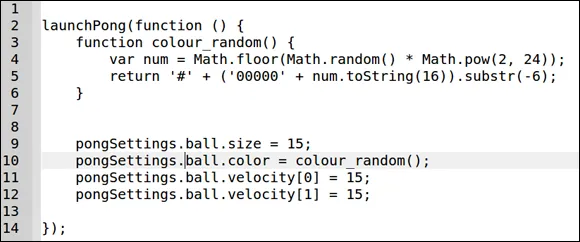
Figure 1-1 shows lines of code from the popular game Pong. Don’t worry about trying to understand what every single line does.
image
Figure 1-1: Computer code from the game Pong.
tip
Be careful when using the number of lines of code as a measure of a program’s complexity. Just like when writing in English, 100 well-written lines of code can perform the same functionality as 1,000 poorly written lines of code.
This book describes the ins and outs of careers in coding but will not teach you a programming language. In Part III, you can read about the different ways you can learn to code: by yourself, in a coding boot camp, in college, and on the job.

Why Coding Matters: Past, Present, Future

Today, programs written with code power so many different activities, and the work they do can almost seem like magic. With a few mouse clicks or finger taps, you can see your current location on a map, have groceries delivered to your door, or video chat with someone in another country. Although the research and development to make these advancements possible has been massive — billions of dollars invested and millions of hours worked — it has been worthwhile. In this section, I briefly describe a history of code and possibilities for the future.

Coding in the past

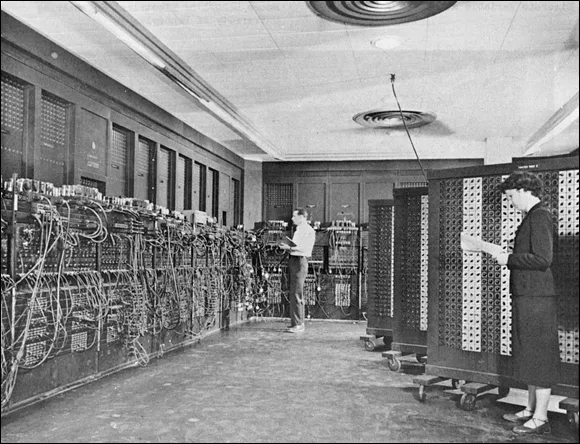
Unveiled in 1946 at the University of Pennsylvania, ENIAC was the first general-purpose computer. See Figure 1-2. It was the size of a large room, and programmers punched holes in paper cards to code programs that could take hours to complete. Sometimes bugs would crawl inside these large computers, causing the circuits to malfunction and resulting in errors. Removing these bugs from the computer was called debugging, which is the name used even today.
image
Figure 1-2: ENIAC was the size of a large room.
Gradually, with advances in hardware, computers became smaller and more powerful. Whereas the ENIAC’s tens of thousands of resistors and capacitors took up almost 2,000 square feet, later microprocessors could fit all these electronics onto a chip the size of a postage stamp. Eventually, these microprocessors would be built using silicon, which is both cheap and plentiful.
Increased computing power from powerful microprocessors allowed programmers to write more complicated and resource-intensive programs. For example, computer games became faster, used more complex graphics, and displayed on-screen smoothly and realistically. Writing code, or software programming, depends on and is constrained by the underlying hardware on which the code runs. As computing power increases, code is written to provide more features at a faster speed to users.
Programming languages were also invented to take advantage of this new computing power. You may remember languages such as Basic, Fortran, Pascal, C++, and Java. Like spoken languages, programming languages were created to fill a need. If other programmers coded using the language, the programming language would survive and thrive; otherwise, it would die.
technicalstuff
Popular programming languages can decline in popularity or die, but this can take a long time if the language is used for core processes. For example, Fortran is not nearly as popular as it was 30 years ago, but it continues to be used in the scientific community and in the financial sector, where it powers applications for some of the biggest banks in the world.

Coding today

In 2011, Marc Andreessen, creator of Netscape Navigator and now a venture capitalist, noted that “software is eating the world.” He predicted that software companies would rapidly disrupt existing companies. Traditionally, software was used on desktops and laptops. The software had to be installed, and the installation process at a minimum varied by computer type and might not even work or might be incompatible with your computer hardware and software. After the software was installed, you had to supply data to the program.
Four trends have dramatically increased the use of code in everyday life:
  • Web-based software: This software operates in the browser without requiring installation. For example, if you want to check email, you previously had to install an email client by downloading the software or from a CD-ROM. Issues arose when the software was not available for your operating system or conflicted with your operating system version. Hotmail, a web-based email client, rose to popularity in part because it allowed users visiting www.hotmail.com to instantly check email without worrying about installation or software compatibility. Web applications increased consumer appetite to try more applications, and developers in turn were incentivized to write more applications.
  • Internet broadband connectivity: Broadband connectivity has increased, providing a fast Internet connection to more people in the last few years than in the previous decade. Today, more than 2 billion people can access web-based software, up from approximately 50 million only a decade ago.
  • Coding repositories: Anyone can publish code for others to view and use. Popular coding repositories, such as Github, are making coding a more collaborative, open, and public process than ever before. Programmers publish code to show others what they can build, to solicit feedback to increase functionality or find vulnerabilities, and to quickly spread software to other programmers.
  • Mobile phones: Today’s smartphones bring programs with you wherever you go and help supply data to programs. Many software programs became more useful w...

Table of contents

  1. Cover
  2. Title Page
  3. Table of Contents
  4. Introduction
  5. Part I: Getting a Job in Coding
  6. Part II: Technologies Used When Coding
  7. Part III: Getting Your Coding Education
  8. Part IV: Launching Your Career Path
  9. Part V: The Part of Tens
  10. Talk the Talk
  11. About the Author
  12. Cheat Sheet
  13. Connect with Dummies
  14. End User License Agreement