THAT OLD SAYING about good things coming in small packages describes the Raspberry Pi perfectly. It also highlights an advance in computer architecture—the system-on-a-chip (SoC), a tiny package with a rather large collection of ready-to-use features. The SoC isn’t so new—it’s been around a long time—but the Raspberry Pi’s designers have put it into a small, powerful package that is readily available to students and adults alike. All for a very low price.
A tiny piece of electronics about the size of a credit card, the Raspberry Pi single-board computer packs very respectable computing power into a small space. It provides tons of fun and many, many possibilities for building and controlling all sorts of fascinating gizmos. When something is small, after all, it fits just about anywhere. The Raspberry Pi does things conventional computers just can’t do in terms of both portability and connectivity. Things you will find inspire your creativity—fun things!
What’s not to like? Get ready for some truly exciting computer architecture.
In this chapter introducing the truly phenomenal Raspberry Pi line of computer boards, we look first at the Raspberry Pi’s goals and history. We include the history of the Raspberry Pi’s development and the visionary people at the Raspberry Pi Foundation who dreamed up the concept and achieved the reality, and we look at the advantages this tiny one-board computer has over much larger computers. We then take a tour of the Raspberry Pi board.
Growing Delicious, Juicy Raspberries
As significant advances in computing go, the Raspberry Pi’s primary innovation was the lowering of the entry barrier into the world of embedded Linux. The barrier was twofold—price and complexity. The Raspberry Pi’s low price solved the price problem (cheap is good!) and the SoC reduced circuit complexity rather dramatically, making a much smaller package possible.
The road to the development of the Raspberry Pi originated at a surprising point—through a registered charity in the UK, which continues to operate today.
The Raspberry Pi Foundation, registered with the Charity Commission for England and Wales, first opened its doors in 2009 in Caldecote, Cambridgeshire. It was founded for the express purpose of promoting the study of computer science in schools. A major impetus for its creation came from a team consisting of Eben Upton, Rob Mullins, Jack Lang and Alan Mycroft. At the University of Cambridge’s Computer Laboratory, they had noted the declining numbers and low-level skills of student applicants. They came to the conclusion that a small, affordable computer was needed to teach basic skills in schools and to instill enthusiasm for computing and programming.
Major support for the Foundation’s goals came from the University of Cambridge Computer Laboratory and Broadcom, which is the company that manufactures the SoC—the Broadcom 2835 or 2836, depending on the model—that enables the Raspberry Pi’s power and success. Later in this chapter you will read more on that component, which is the heart and soul of the Raspberry Pi.
The founders of the Raspberry Pi had identified and acted on the perceived need for a tiny, affordable computer. By 2012, the Model B had been released at a price of about £25. The fact that this represented great value for money was recognised immediately, and first-day sales blasted over 100,000 units. In less than two years of production, more than two million boards were sold.
The Raspberry Pi continued to enjoy good sales and wide acceptance following the highly successful release of the Model B+ (in late 2014). And in 2015, the fast, data-crunching Raspberry Pi 2 Model B with its four-core ARM processor and additional onboard memory sold more than 500,000 units in its first two weeks of release. Most recently, the Raspberry Pi Zero, a complete computer system on a board for £4—yes, £4—was released. It’s an awesome deal if you can get one—the first batch sold out almost immediately.
In 2016, the Raspberry Pi Model 3 Model B arrived. It sports a 1.2GHz 64-bit quad-core ARMv8 CPU, 1 GB RAM, and built-in wireless and Bluetooth! All for the same low price.
The original founders of the Raspberry Pi Foundation included:
- Eben Upton
- Rob Mullins
- Jack Lang
- Alan Mycroft
- Pete Lomas
- David Braben
The organisation now consists of two parts:
- Raspberry Pi (Trading) Ltd. performs engineering and sales, with Eben Upton as CEO.
- The Raspberry Pi Foundation is the charitable and educational part.
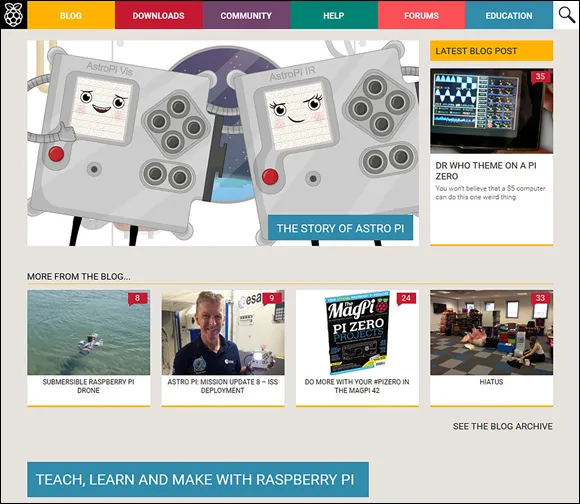
The Raspberry Pi Foundation’s website at www.raspberrypi.org (see Figure 1-1) presents the impetus that resulted in the Raspberry Pi. This is what they say on the About Us page:
As a result, the founders’ stated goal was “to advance the education of adults and children, particularly in the field of computers, computer science and related subjects”.
Their answer to the problem, of course, was the Raspberry Pi, which was designed to emulate in concept the hands-on appeal of computers from the previous decade (the 1990s). The intention behind the Raspberry Pi was to be a “catalyst” to inspire students by providing affordable, programmable computers everywhere.
The Raspberry Pi is well on its way to achieving the Foundation’s goal in bettering computer education for students. However, another significant thing has happened; a lot of us older people have found the Raspberry Pi exciting. It’s been adopted by generations of hobbyists, experimenters and many others, which has driven sales into new millions of units.
While the sheer compactness of the Raspberry Pi excites, resonates and inspires adults as well as youngsters, what truly prompted its success was its low price and scope of development. Embedded Linux has always been a painful subject to learn, but the Pi makes it simple and inexpensive. Continuing education in computers gets just as big a boost as initial education in schools.
System-on-a-Chip
An SoC or system-on-a-chip is an integrated circuit (IC) that has the major components of a computer or any other electronic system on a single chip. The components include a central processing unit (CPU), a graphics processing unit (GPU) and various digital, analogue and mixed signal circuits on just one chip.
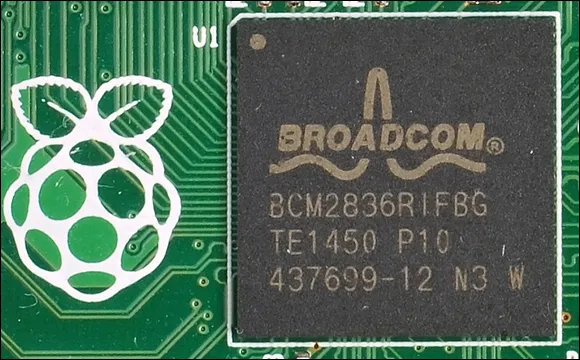
This SoC component makes highly dense computing possible, such as all the power that is shoehorned into the Raspberry Pi. Figure 1-2 shows the Broadcom chip on the Raspberry Pi 2 Model B. It’s a game-changing advance in computer architecture, enabling single-card computers that rival and often exceed the capabilities of machines that are many times their size. Chapter 8, “Operating Systems”, covers these small but mighty chips in detail.
The Raspberry Pi features chips that are developed and manufactured by Broadcom Limited. Specifically, the older models as well as the latest (the £4 Raspberry Pi Zero) come with the Broadcom BCN2835 and the Raspberry Pi 2 has the Broadcom BCM2836, and the new Model 3 uses the Broadcom BCM2837. The biggest difference between these two SoC ICs is t...