SketchUp for Site Design
eBook - ePub

SketchUp for Site Design

A Guide to Modeling Site Plans, Terrain, and Architecture

  1. English
  2. ePUB (mobile friendly)
  3. Available on iOS & Android
eBook - ePub

SketchUp for Site Design

A Guide to Modeling Site Plans, Terrain, and Architecture

About this book

The site designer's guide to SketchUp's powerful modeling capabilities

SketchUp for Site Design is the definitive guide to SketchUp for landscape architects and other site design professionals. Step-by-step tutorials walk you through basic to advanced processes, with expert guidance toward best practices, customization, organization, and presentation. This new second edition has been revised to align with the latest software updates, with detailed instruction on using the newest terrain modeling tools and the newly available extensions and plug-ins. All graphics have been updated to reflect the current SketchUp interface and menus, and the third part of the book includes all-new content featuring the use of new grade and terrain extensions. Developed around the needs of intermediate professional users and their workflows, this book provides practical all-around coaching on using SketchUp specifically for modeling site plans.

SketchUp was designed for usability, with the needs of the architect, industrial designer, and engineers at center stage. This book shows you how the software's powerful terrain and grade functions make it an ideal tool for site designers, and how to seamlessly integrate it into your workflow for more efficient design and comprehensive planning.

  • Master the SketchUp basics, navigation, components, and scripts
  • Turn 2D sketches into 3D models with volume, color, and material
  • Create detailed site plans, custom furnishings, gradings, and architecture
  • Learn sandbox tools, organization strategies, and model presentation tips

SketchUp has undergone major changes since the publication of this guide's first edition, with its sale to Trimble Navigation bringing about a number of revisions and the availability of more immediately useful features. SketchUp for Site Design shows you how to harness the power of this newly expanded feature set to smooth and optimize the site design workflow.


Frequently asked questions

Yes, you can cancel anytime from the Subscription tab in your account settings on the Perlego website. Your subscription will stay active until the end of your current billing period. Learn how to cancel your subscription.
No, books cannot be downloaded as external files, such as PDFs, for use outside of Perlego. However, you can download books within the Perlego app for offline reading on mobile or tablet. Learn more here.
Perlego offers two plans: Essential and Complete
  • Essential is ideal for learners and professionals who enjoy exploring a wide range of subjects. Access the Essential Library with 800,000+ trusted titles and best-sellers across business, personal growth, and the humanities. Includes unlimited reading time and Standard Read Aloud voice.
  • Complete: Perfect for advanced learners and researchers needing full, unrestricted access. Unlock 1.4M+ books across hundreds of subjects, including academic and specialized titles. The Complete Plan also includes advanced features like Premium Read Aloud and Research Assistant.
Both plans are available with monthly, semester, or annual billing cycles.
We are an online textbook subscription service, where you can get access to an entire online library for less than the price of a single book per month. With over 1 million books across 1000+ topics, we’ve got you covered! Learn more here.
Look out for the read-aloud symbol on your next book to see if you can listen to it. The read-aloud tool reads text aloud for you, highlighting the text as it is being read. You can pause it, speed it up and slow it down. Learn more here.
Yes! You can use the Perlego app on both iOS or Android devices to read anytime, anywhere — even offline. Perfect for commutes or when you’re on the go.
Please note we cannot support devices running on iOS 13 and Android 7 or earlier. Learn more about using the app.
Yes, you can access SketchUp for Site Design by Daniel Tal in PDF and/or ePUB format, as well as other popular books in Architecture & Urban Planning & Landscaping. We have over one million books available in our catalogue for you to explore.

Information

Publisher
Wiley
Year
2016
Print ISBN
9781118985076
eBook ISBN
9781118985069

PART 1

Introduction to SketchUp

CHAPTER 1
How to Use This Book

Welcome to the second edition of SketchUp for Site Design. This book describes SketchUp Process Modeling, a methodology for working with SketchUp. This approach provides a step-by-step road map that will show you how to use the tools and functions to construct expressive models of exterior spaces and architecture.
The process addresses three main areas of instruction: drafting, modeling order, and organization. Mastering these skills will allow you to create models that are highly detailed and articulate, easy to work with, optimized for computer performance, and organized.
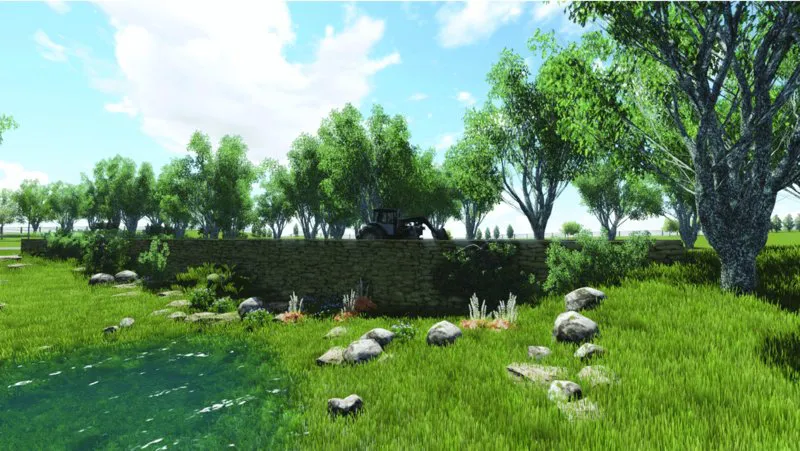
Figs. 1.1 through 1.3 and Figs. 1.8 through 1.13 are examples of site plans and architectural projects created using SketchUp Process Modeling.
images
Figure 1.1 Model of park overlook (SketchUp model rendered in Lumion)
images
Figure 1.2 Cherry Hills residence, Colorado (SketchUp model rendered in Lumion)
images
Figure 1.3 Cherry Hills residence bridge crossing (SketchUp model rendered in Lumion)
The book contents and tutorials were designed to work with all versions of SketchUp. Readers are strongly encouraged to download the free version of SketchUp, called SketchUp Make, from SketchUp’s website (www.sketchup.com).

What’s New in the Second Edition?

SketchUp has undergone a number of changes since the first edition of SketchUp for Site Design was published in August of 2009. Mainly, Trimble purchased SketchUp from Google. The new ownership has proven a positive outcome for SketchUp with a boost to staff and development resources. As a result, SketchUp has added a number of new features and improved performance.
SketchUp for Site Design has aged well with SketchUp. The original manuscript was written to focus on processes and methods over tools and menus. The processes are still valid, as are the many tutorials found in this book. In this regard, the second edition has remained unchanged.
However, given the changes to the software, SketchUp for Site Design contains updated content and includes two new chapters:
  • Chapter 5, “Ruby Scripts,” has been retitled “SketchUp Extensions.” This completely rewritten chapter provides a concise and clear overview of must-use custom apps (tools) for SketchUp.
  • Chapter 15, “Sandbox Architecture,” has been replaced with “Digital Elevation Modeling.” This chapter reviews how to generate and model on imported terrain and contour files, and it fits with the natural progression of Part 3, “Terrain Modeling.”
Updated tool tips and processes are included throughout the various tutorials. Primarily, the updates focus on how to use extensions or apps as part of the grading, terrain, and CAD-to-SketchUp workflow.

www.danieltal.com

There is a subscription website that includes free resources (and free sign-up) to accompany this book. This book stands on its own; however, the resources available at www.danieltal.com are an excellent supplement. You do not need to become a member at DanielTal.com to learn and apply the skills and processes.
The website is mentioned in several chapters, usually to indicate where...

Table of contents

  1. Cover
  2. Title Page
  3. Copyright
  4. Dedication
  5. Part 1: Introduction to SketchUp
  6. Part 2: SketchUp Process Modeling
  7. Part 3: Terrain Modeling
  8. Part 4: AutoCAD to SketchUp
  9. Index
  10. EULA