How to Implement Market Models Using VBA
eBook - ePub

How to Implement Market Models Using VBA

  1. English
  2. ePUB (mobile friendly)
  3. Available on iOS & Android
eBook - ePub

How to Implement Market Models Using VBA

About this book

Accessible VBA coding for complex financial modelling

How to Implement Market Models Using VBA makes solving complex valuation issues accessible to any financial professional with a taste for mathematics. With a focus on the clarity of code, this practical introductory guide includes chapters on VBA fundamentals and essential mathematical techniques, helping readers master the numerical methods to build an algorithm that can be used in a wide range of pricing problems. Coverage includes general algorithms, vanilla instruments, multi-asset instruments, yield curve models, interest rate exotics, and more, guiding readers thoroughly through pricing in the capital markets area. The companion website (http://implementmodinvba.com/) features additional VBA code and algorithmic techniques, and the interactive blog provides a forum for discussion of code with programmers and financial engineers, giving readers insight into the different applications and customisations possible for even more advanced problem solving..

Financial engineers implement models from a mathematical representation of an asset's performance by building a program that performs a valuation of securities based on this asset. How to Implement Market Models Using VBA makes this technical process understandable, with well-explained algorithms, VBA code, and accessible theoretical explanations.

  • Decide which numerical method to use in which scenario
  • Identify the necessary building blocks of an algorithm
  • Write clear, functional VBA code for a variety of problems
  • Apply algorithms to different instruments and models

Designed for finance professionals, this book brings more accurate modelling within reach for anyone with interest in the market. For clearer code, patient explanation, and practical instruction, How to Implement Market Models Using VBA is an essential introductory guide.

Tools to learn more effectively

Saving Books

Saving Books

Keyword Search

Keyword Search

Annotating Text

Annotating Text

Listen to it instead

Listen to it instead

Information

Publisher
Wiley
Year
2015
Print ISBN
9781118962008
eBook ISBN
9781118961995
Edition
1
Subtopic
Finance

Chapter 1
The Basics of VBA Programming

1.1 Getting started

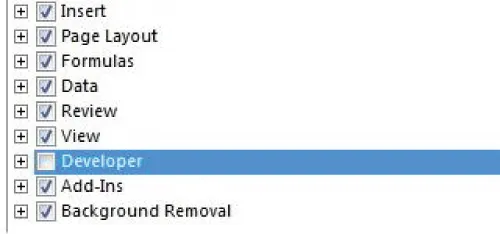
To access the VBA editor, point to the Developer (VBA menu on the ribbon). In case this menu is not visible, proceed like this:
Office 2007
Click the Microsoft Office Button
c01g001
then click on Excel Options (bottom right). Point to Popular and mark Show Developer tab in the Ribbon check box, then OK: the Developer tab is now displayed on the ribbon
Office 2010 and beyond
Point the File menu and select Options
Click on Customize Ribbon, and mark Developer
c01g002
When you click on Developer, Excel displays a minimum of three groups:
  • Code: this is the group from which you open the VBA editor
  • Controls: user interface components, to create Windows-like applications
  • XML: converts XML files into Excel files and vice versa.
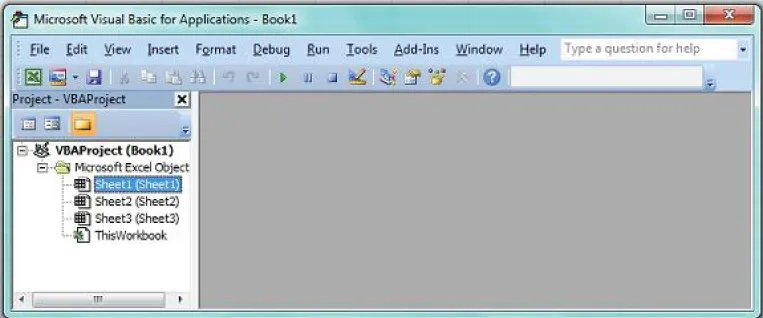
From the Code group, click on “Visual basic” icon (far left). If you work on a newly created file, the VBA editor looks like this:
c01g003
The bar on the top provides three especially useful menus:
  • View: a menu that lists windows editing information regarding the code execution. Also hides or shows the project explorer (on the left). At creation, the project reduces to three open sheets and an empty module named ThisWorkbook. As new contents are added in your project, they appear in one of the following items:
    • Module
    • Class Module
    • UserForm
  • Insert: from this menu, you can add modules to edit your procedures, or class modules if you need to create customized objects. You can also build UserForms from this menu.
  • Debug: from this menu, you can toggle breakpoints where the execution of the code is interrupted. To track algorithmic mistakes, you can also activate the execution step by step (shortcut F8) and watch the changes in some variables, displayed in the Immediate window or Local variables window (see View menu).
You cannot write any code on the central gray colored zone: all the procedures must be coded within a module.
The specific ThisWorkbook component contains macros that are executed automatically at the opening of the workbook or when special events, such as the updating of one sheet, come up.

1.2 VBA objects and syntax

VBA objects are essentially visible pieces of Excel applications. This definition includes sheets, ranges of cells, icons on the ribbon, and custom interfaces.
To handle objects, one must specify their types. For instance, a range of cells is given the type Range. To locate a Range in the Excel application, we use its physical coordinates on the sheet. For instance the cell “D5” is identified by
Range("D5") or [D5]
A range of cells (e.g., D5:F8) is identified as
Range("D5:F8") or [D5:F8]
Objects of the same type can also be pulled together into a Collection, a set of indexed elements. We list below some common collections of objects in VBA:
  • Worksheets: collection of worksheet-type in a file
  • Sheets: collection of worksheets + charts + dialog sheets
  • Cells: collection of cells within a range
  • Workbooks: collection of Excel application files open at the same time.
How do you access an element of a collection?
  • either through the name of the element (e.g., Worksheets(“VAT”))
  • or its index (e.g., Worksheets(2): 2nd Excel sheet tab)
We highly recommend designating the cells of a sheet through their coordinates (
c01-math-0001
). For example
Cells(i,j)
denotes the cell at the intersection of the i-th row and the j-th column of the sheet.
You must be aware that charts are members of the sheets collection, just like worksheets: if your project includes charts, you must be aware that the order has changed in the collection.

1.2.1 The ...

Table of contents

  1. Cover
  2. Title Page
  3. Copyright
  4. Preface
  5. Acknowledgements
  6. Abbreviations
  7. About the Author
  8. Chapter 1: The Basics of VBA Programming
  9. Chapter 2: Mathematical Algorithms
  10. Chapter 3: Vanilla Instruments
  11. Chapter 4: Numerical Solutions
  12. Chapter 5: Monte-Carlo Pricing Issues
  13. Chapter 6: Yield Curve Models
  14. Chapter 7: Stochastic Volatilities
  15. Chapter 8: Interest Rate Exotics
  16. Bibliography
  17. Index
  18. End User License Agreement

Frequently asked questions

Yes, you can cancel anytime from the Subscription tab in your account settings on the Perlego website. Your subscription will stay active until the end of your current billing period. Learn how to cancel your subscription
No, books cannot be downloaded as external files, such as PDFs, for use outside of Perlego. However, you can download books within the Perlego app for offline reading on mobile or tablet. Learn how to download books offline
Perlego offers two plans: Essential and Complete
  • Essential is ideal for learners and professionals who enjoy exploring a wide range of subjects. Access the Essential Library with 800,000+ trusted titles and best-sellers across business, personal growth, and the humanities. Includes unlimited reading time and Standard Read Aloud voice.
  • Complete: Perfect for advanced learners and researchers needing full, unrestricted access. Unlock 1.4M+ books across hundreds of subjects, including academic and specialized titles. The Complete Plan also includes advanced features like Premium Read Aloud and Research Assistant.
Both plans are available with monthly, semester, or annual billing cycles.
We are an online textbook subscription service, where you can get access to an entire online library for less than the price of a single book per month. With over 1 million books across 990+ topics, we’ve got you covered! Learn about our mission
Look out for the read-aloud symbol on your next book to see if you can listen to it. The read-aloud tool reads text aloud for you, highlighting the text as it is being read. You can pause it, speed it up and slow it down. Learn more about Read Aloud
Yes! You can use the Perlego app on both iOS and Android devices to read anytime, anywhere — even offline. Perfect for commutes or when you’re on the go.
Please note we cannot support devices running on iOS 13 and Android 7 or earlier. Learn more about using the app
Yes, you can access How to Implement Market Models Using VBA by Francois Goossens in PDF and/or ePUB format, as well as other popular books in Business & Finance. We have over one million books available in our catalogue for you to explore.