Teach Yourself VISUALLY Photoshop Elements 12
eBook - ePub

Teach Yourself VISUALLY Photoshop Elements 12

  1. English
  2. ePUB (mobile friendly)
  3. Available on iOS & Android
eBook - ePub

Teach Yourself VISUALLY Photoshop Elements 12

About this book

Are you a visual learner? Do you prefer instructions that show you how to do something — and skip the long-winded explanations? If so, then this book is for you. Open it up and you'll find clear, step-by-step screen shots that show you how to tackle more than 160 Photoshop Elements tasks. Each task-based spread covers a single technique, sure to help you get up and running on Photoshop Elements 12 in no time.

You'll learn to:

  • Use both the Organizer and Editor
  • Import photos from various sources
  • Enhance lighting and color
  • Restore old photos and add effects
  • Save, back up, and share photos

Designed for visual learners

  • Two-page lessons break big topics into bite-sized modules
  • Succinct explanations walk you through step by step
  • Full-color screen shots demonstrate each task
  • Helpful sidebars offer practical tips and tricks

Frequently asked questions

Yes, you can cancel anytime from the Subscription tab in your account settings on the Perlego website. Your subscription will stay active until the end of your current billing period. Learn how to cancel your subscription.
At the moment all of our mobile-responsive ePub books are available to download via the app. Most of our PDFs are also available to download and we're working on making the final remaining ones downloadable now. Learn more here.
Perlego offers two plans: Essential and Complete
  • Essential is ideal for learners and professionals who enjoy exploring a wide range of subjects. Access the Essential Library with 800,000+ trusted titles and best-sellers across business, personal growth, and the humanities. Includes unlimited reading time and Standard Read Aloud voice.
  • Complete: Perfect for advanced learners and researchers needing full, unrestricted access. Unlock 1.4M+ books across hundreds of subjects, including academic and specialized titles. The Complete Plan also includes advanced features like Premium Read Aloud and Research Assistant.
Both plans are available with monthly, semester, or annual billing cycles.
We are an online textbook subscription service, where you can get access to an entire online library for less than the price of a single book per month. With over 1 million books across 1000+ topics, we’ve got you covered! Learn more here.
Look out for the read-aloud symbol on your next book to see if you can listen to it. The read-aloud tool reads text aloud for you, highlighting the text as it is being read. You can pause it, speed it up and slow it down. Learn more here.
Yes! You can use the Perlego app on both iOS or Android devices to read anytime, anywhere — even offline. Perfect for commutes or when you’re on the go.
Please note we cannot support devices running on iOS 13 and Android 7 or earlier. Learn more about using the app.
Yes, you can access Teach Yourself VISUALLY Photoshop Elements 12 by Mike Wooldridge in PDF and/or ePUB format, as well as other popular books in Informatica & Media digitali. We have over one million books available in our catalogue for you to explore.

Information

Publisher
Visual
Year
2013
Print ISBN
9781118729212
eBook ISBN
9781118729229
Edition
1
Chapter 1
Getting Started
Are you interested in working with digital images on your computer? This chapter introduces you to Adobe Photoshop Elements 12, a popular software application for editing and creating digital images. Photoshop Elements also enables you to organize your collection of digital images so you can easily find what you are looking for.
9781118729212-co0101.tif
Introducing Photoshop Elements 12
Understanding Digital Images
Start Photoshop Elements
Explore the Editor Workspace
Tour the Organizer Workspace
Switch between the Organizer and the Editor
Introducing the Photoshop Elements Tools
Switch Editor Modes
Work with Tools
Work with Panels
Set Program Preferences
View Rulers and Guides
Introducing Photoshop Elements 12
Photoshop Elements is a popular photo-editing program you can use to modify, optimize, and organize digital images. You can use the program’s Editor to make imperfect snapshots clearer and more colorful as well as retouch and restore older photos. With layers, you can isolate objects in your images and apply special effects just to those objects or combine multiple images into a collage. You can also use the program’s Organizer to group your photos into albums, assign descriptive keyword tags, discover visually similar images, create slide shows, and more. When you are done with your images, you can use Photoshop Elements to save them for sharing on the web or print them out.
Manipulate Photos
9781118729212-fg0101.eps
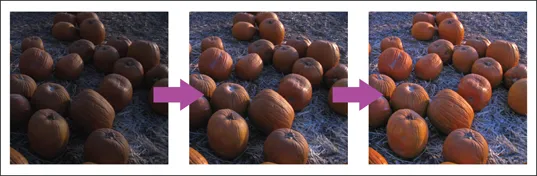
As its name suggests, Photoshop Elements excels at enabling you to edit elements in your digital photographs. The program includes numerous image-editing tools and commands you can apply to manipulate the look of your photos. Whether you import photos from a digital camera or a scanner, you can apply a wide variety of editing techniques to your images, from subtle adjustments in color to elaborate filters that make your snapshots look like paintings. See Chapter 7 for more on manipulating selected parts of your photos. See Chapter 12 for more on painting and drawing, and see Chapter 13 for more on using filters.
Retouch and Repair
9781118729212-fg0102.eps
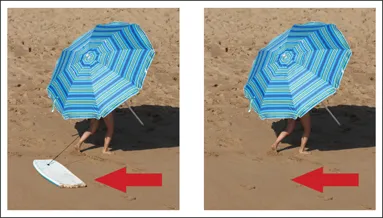
You can use Photoshop Elements to edit new photos to make them look their best as well as retouch and repair older photos that suffer from aging problems. For example, you can restore a faded photo by using saturation controls to make it more vibrant, or you can use the Clone Stamp tool to repair a tear or stain. You can also use the program’s exposure commands to fix lighting problems as well as edit out unwanted objects with the Healing Brush. See Chapter 9 for more on retouching...
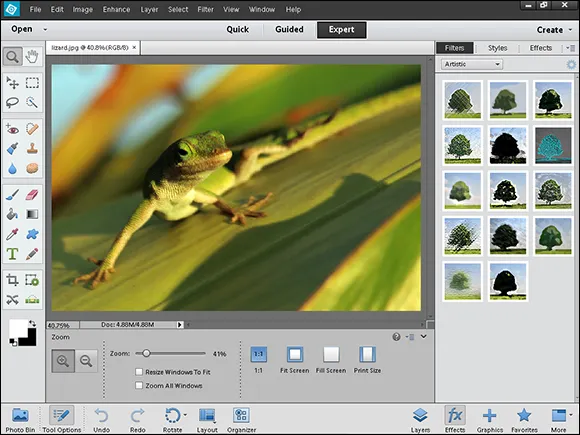
Table of contents

  1. Cover
  2. Table of Contents
  3. Title Page
  4. Chapter 1: Getting Started
  5. Chapter 2: Importing and Opening Digital Images
  6. Chapter 3: Organizing Your Photos
  7. Chapter 4: Using Advanced Organizing Tools
  8. Chapter 5: Applying Basic Image Edits
  9. Chapter 6: Making Selections
  10. Chapter 7: Manipulating Selections
  11. Chapter 8: Using Layers
  12. Chapter 9: Enhancing and Retouching Photos
  13. Chapter 10: Enhancing Lighting and Color
  14. Chapter 11: Apply Guided Edits
  15. Chapter 12: Painting and Drawing on Photos
  16. Chapter 13: Applying Filters
  17. Chapter 14: Adding Text Elements
  18. Chapter 15: Applying Styles and Effects
  19. Chapter 16: Saving and Sharing Your Work