![]()
Chapter 1
Getting Started
WHAT’S IN THIS CHAPTER?
- Learning about the software used in this book
- Downloading the book’s SDK
- Understanding the SDK architecture
- Importing projects into your IDE
- Understanding this book’s template application
- Learning how to work with the template code structure
In this chapter, you will first start by setting up your development environment to be able to work with this book’s tutorials and examples.
You will then receive a quick introduction about this book’s SDK and where to download it, and learn about the different directories it contains. Then you will learn how to import this book’s existing SDK projects and templates into your favorite IDE, as you will do throughout this book when following the different tutorials.
Moving on to the last section of this chapter, you will learn about this book’s cross-platform template project. And finally, this chapter concludes with a quick tutorial that will help you to get familiar with the events of the template, as well as with the tone that will be used for all the tutorials in this book.
SOFTWARE REQUIREMENTS
This book’s content is built to run on iOS 5.x+ as well as for Android 2.x+, the latest and most stable versions of these two mobile operating systems at the time this book was written.
For iOS Developers
To use this book for iOS, all you have to do is to grab a copy of the latest iOS SDK available at http://developer.apple.com, and install it on your Mac.
Out-of-the-box the iOS SDK provides a simulator with full GLES v2 support, so even if you do not have an iOS device, or do not have an official iOS Developer Certification from Apple, you can still make full use of this book.
For Android Developers
To set up your environment for Android, it is unfortunately not as easy as for iOS. First go to http://developer.android.com/sdk/installing.html and follow the instructions to install the Android SDK, Eclipse, and the ADT plug-in. Please note that the Android SDK version used for this book was v2.3.4, but later versions should also work as well.
All the code in this book uses C/C++, which means that you will have to install Android Native Code support. To finalize the installation of your development environment, follow these steps:
1. Grab a copy of the Android NDK at the following address: http://developer.android.com/sdk/ndk/index.html. The version used at the time of writing this book was r5c, but all examples and tutorials should work on later versions as well. Download the Android NDK zip package and decompress it on your machine where you have read and write access.
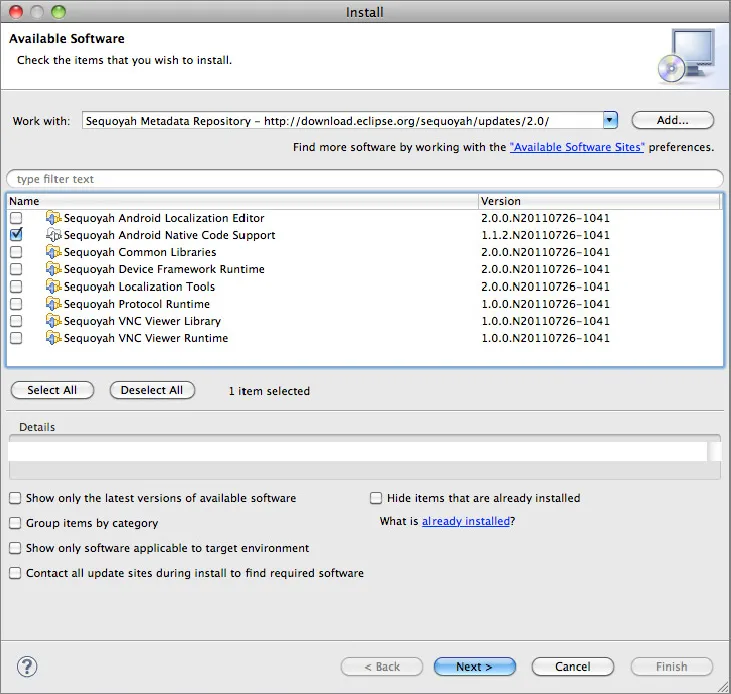
2. In order to compile and debug native code using Eclipse, you will need to install the Sequoyah plug-in. To do this, first enable the repository that is located (from the Eclipse main menu) in: Help ⇒ Install New Software ⇒ Available Software Sites ⇒ Sequoyah Metadata Repository. Then select the entry from the Work With combo box, and once the repository data is loaded, select and install the Sequoyah Android Native Code Support, as shown in Figure 1-1.
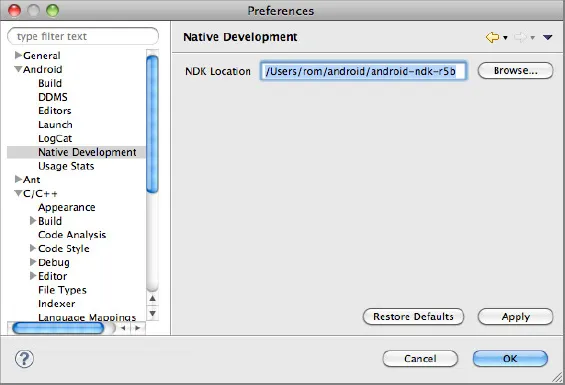
3. Once Sequoyah is installed, go to (from the main menu): Eclipse Preferences ⇒ Android ⇒ Native Development and specify the location where you extracted the Android NDK in step 1, as shown in Figure 1-2.
Congratulations — your Android development environment is now all set! However, please note that in order to use this book with Android you will need an actual device with OpenGL ES 2.0 support. The emulator provided by the Android SDK supports only OpenGL ES 1.x, not OpenGL ES 2.0. So local deployment on the simulator is not possible on Android; only device deployment is supported when using GLES 2.
DOWNLOADING THE BOOK’S SDK
Once your development environment is set up, you should now grab a copy of this book’s SDK. The official SDK is available for download at
http://www.wrox.com. Alternatively, if you wish to download it through GIT, go to the official GFX 3D engine website,
http://gfx.sio2interactive.com, where you can find detailed instructions.
If you have downloaded the zip file, simply decompress it in a directory that you have read and write access to. If you have downloaded it using GIT, all the files and the SDK architecture are already available on your drive.
The architecture of this book’s SDK is very simple. For more information, please refer to the following directory list:
- _chapter#-#: Contains the final result that you should reproduce by reading the tutorials in the book. At any time while reading this book, if you feel that the instructions are not clear, or if you are unsure where to insert some code, or even if you simply want to preview the final result of a tutorial, open this directory. Inside the directory, you can then find at the root the source files used by the tutorial (respectively named templateApp.cpp and templateApp.h) and two directories that contain the project files for iOS and Android. You can then load the project into your IDE and rebuild it from scratch.
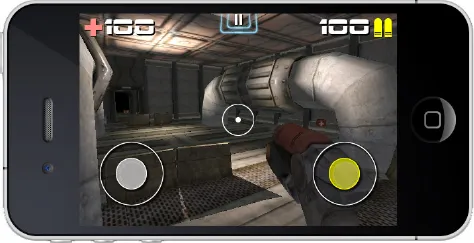
- common: Contains the free and open source GFX 3D engine (the mini game and graphics engine that you will be using in this book) source code of the version that was used to create the templates and tutorials for this book, along with the source of the libraries the engine depends on. The GFX 3D engine is a very small and lightweight graphic engine that is built with bits and pieces of my own professional engine. It is very small, fast, flexible, and scalable; and will allow you to render state-of-the-art graphics on your mobile device, as shown in Figure 1-3.
- data: In this directory, you can find all the original assets that were used in each tutorial. These assets are either linked dynamically to the projects (in the case of iOS) or simply duplicated inside the assets directory of each Android tutorial. Please note that all the original project 3D scenes are available as .blend (the default file extension of Blender). It is not mandatory, but highly suggested that you download a copy of Blender for your platform, which is available at http://blender.org. This will enable you to study the way the scenes are built and how the assets are linked and exported to the Wavefront OBJ (the official 3D model exchange format used in the book).
- EULA: In here, you can find all the End User License Agreements for the different libraries that this book’s SDK relies on. If you plan to release a commercial application using this book’s SDK, make sure that your application complies with all of these licenses.
- glsloptimizerCL: Contains the source to a simple yet powerful command line program that you can use to optimiz...