Better Than Bullet Points
eBook - ePub

Better Than Bullet Points

Creating Engaging e-Learning with PowerPoint

  1. English
  2. ePUB (mobile friendly)
  3. Available on iOS & Android
eBook - ePub

Better Than Bullet Points

Creating Engaging e-Learning with PowerPoint

About this book

Featuring a complete update of the previous edition to reflect the new and expanded tools of PowerPoint 2013. By providing in-depth guidance, specific instructions, and helpful exercises, the book helps everyday trainers to create potent e-learning through the readily available popular desktop application. Established expert Jane Bozarth guides readers through the powerful new and updated features of the soon-to-be-released 2013 version, covering everything from text to art, animation to interactivity. If you have PowerPoint, this book will immediately put free real-world tools in your hands. Also features many online tools, including relevant technical design elements from older PowerPoint versions as well as a wealth of additional tools, templates, and examples.

SECTION ONE: FOUNDATIONS
Chapter One: Creating E-Learning with PowerPoint
Chapter Two: It's About Design, Not Software

SECTION TWO: INTERFACE AND CONTENT
Chapter Three: The Graphic User Interface and Course Architecture
Chapter 4 Designing for Impact
Chapter Five: Creating and Editing Art
Chapter Six: Animation
Chapter Seven: Interactivity
Chapter Eight: Add-Ons, Blending, Performance Support, and Job Aids
Chapter Nine: Adding Narration and Multimedia

SECTION THREE: DELIVERY AND SUPPORT
Chapter Ten: Saving, Uploading, and Distributing
Appendix: PowerPoint Basics
References and Other Sources
Other Resources

Frequently asked questions

Yes, you can cancel anytime from the Subscription tab in your account settings on the Perlego website. Your subscription will stay active until the end of your current billing period. Learn how to cancel your subscription.
At the moment all of our mobile-responsive ePub books are available to download via the app. Most of our PDFs are also available to download and we're working on making the final remaining ones downloadable now. Learn more here.
Perlego offers two plans: Essential and Complete
  • Essential is ideal for learners and professionals who enjoy exploring a wide range of subjects. Access the Essential Library with 800,000+ trusted titles and best-sellers across business, personal growth, and the humanities. Includes unlimited reading time and Standard Read Aloud voice.
  • Complete: Perfect for advanced learners and researchers needing full, unrestricted access. Unlock 1.4M+ books across hundreds of subjects, including academic and specialized titles. The Complete Plan also includes advanced features like Premium Read Aloud and Research Assistant.
Both plans are available with monthly, semester, or annual billing cycles.
We are an online textbook subscription service, where you can get access to an entire online library for less than the price of a single book per month. With over 1 million books across 1000+ topics, we’ve got you covered! Learn more here.
Look out for the read-aloud symbol on your next book to see if you can listen to it. The read-aloud tool reads text aloud for you, highlighting the text as it is being read. You can pause it, speed it up and slow it down. Learn more here.
Yes! You can use the Perlego app on both iOS or Android devices to read anytime, anywhere — even offline. Perfect for commutes or when you’re on the go.
Please note we cannot support devices running on iOS 13 and Android 7 or earlier. Learn more about using the app.
Yes, you can access Better Than Bullet Points by Jane Bozarth in PDF and/or ePUB format, as well as other popular books in Business & Human Resource Management. We have over one million books available in our catalogue for you to explore.

Information

Publisher
Pfeiffer
Year
2013
Print ISBN
9781118674277
eBook ISBN
9781118674123

Section 1

Foundations

Chapter 1

Creating e-Learning with PowerPoint

There’s an urban myth that humans use only 2 percent of their brains. While that’s never been substantiated, the idea does seem to bear out in regard to PowerPoint: most users employ just a fraction of PowerPoint’s capabilities. Those of us in training know that an awful lot of classroom PowerPoint shows are just mind-numbing screen after screen of bulleted text. Adventuresome trainers may add some decorative elements like spinning slide transitions, pretty clip art, or animated text. In its worst application, poorly designed PowerPoint shows are uploaded to the web and called “e-learning.” But they aren’t “e-learning” programs. They are e-presentations or e-lectures or e-reading, but there’s no learning there anywhere. Likewise, those who think PowerPoint can’t be used to create good e-learning programs have likely only seen PowerPoint at its worst: slide after slide of bulleted lists, dizzying irrelevant animation, and decorative rather than meaningful graphics. (For that matter, many e-learning programs, regardless of the authoring tool used, suffer from the same problems. Search Google for a common topic like “online safety training” and see what you find.)
In user testing, Microsoft found that nine out of every ten features that customer wanted to see added to Office products were already in the program.
Ina Fried, www.CNEDnews.com, September 2005
It’s a shame that PowerPoint is so often badly used or underused because it can be so much more than a presentation tool. For those interested in e-learning, it can often replicate what is otherwise done with expensive authoring tools. With PowerPoint, some imagination, and some patience, you can create interesting, engaging online courses with meaningful interactivity. Figures 1.1 through 1.7 show some examples of PowerPoint’s potential.

Examples

Multiple-Choice Quizzes

Figure 1.1. Multiple-Choice Quiz
Source: Simon Drane. Component images. www.crocodile-clips.com
image

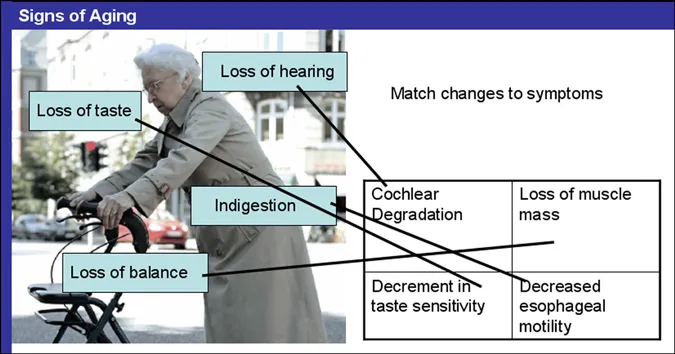
Matching Exercises

Figure 1.2. Matching Exercise
image

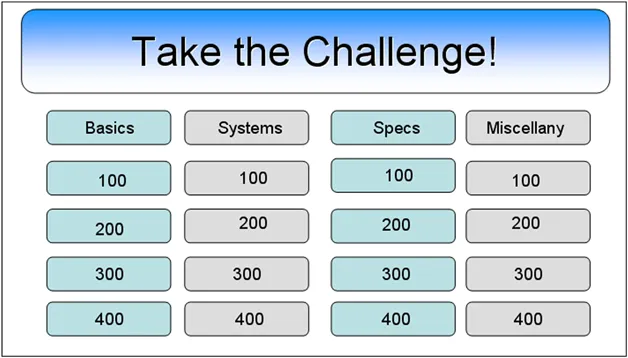
Game-Show-Type Quiz

Figure 1.3. Jeopardy-Type Quiz
image

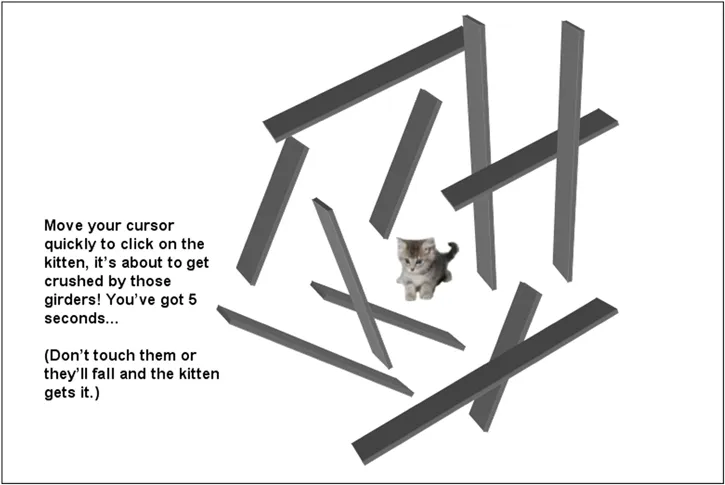
Mazes

Figure 1.4. Maze
Source: Nick D’Alessandro, University of Tasmania. © Commonwealth of Australia. From an online PowerPoint manual available at www.agsci.utas.edu.au/ppmultimedia/. Authored by Nicholas D’Alessandro, Simon James, Anna McEldowney, and Ruth Osborne, University of Tasmania. Copyright notice: Commonwealth of Australia. Copyright Regulations 1969. This material has been reproduced and communicated to you by or on behalf of the University of Tasmania pursuant to Part VB of the Copyright Act 1968 (the Act). The material in this communication may be subject to copyright under the Act. Any further reproduction or communication of this material by you may be the subject of copyright protection under the Act.
image

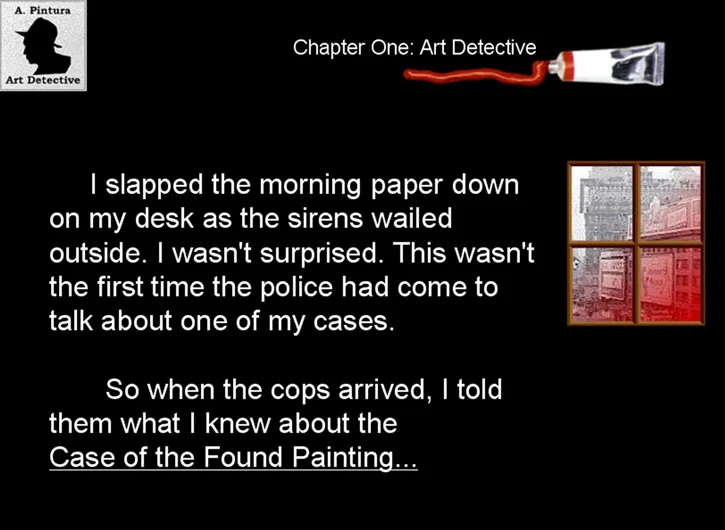
Case Studies

Figure 1.5. Case Study
image

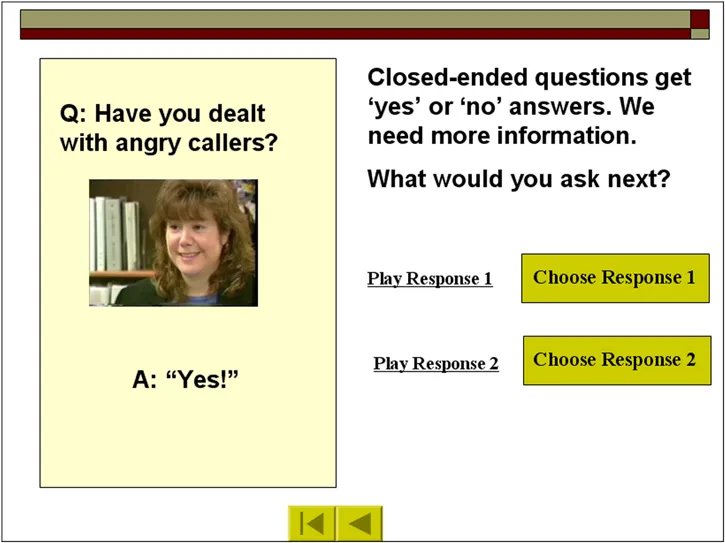
Simulations with Branching Decision Making, with Embedded Audio and Video Clips

Figure 1.6. Simulation with Branching Decision Making
image

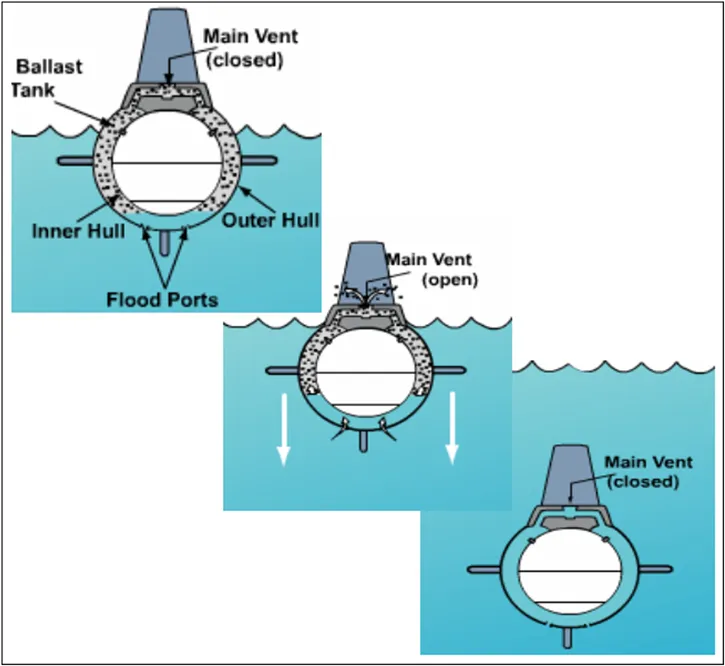
Animations That Teach

Figure 1.7. Animation Illustrating Concept
Source: www.onr.navy/mil
image

Let’s Get Started

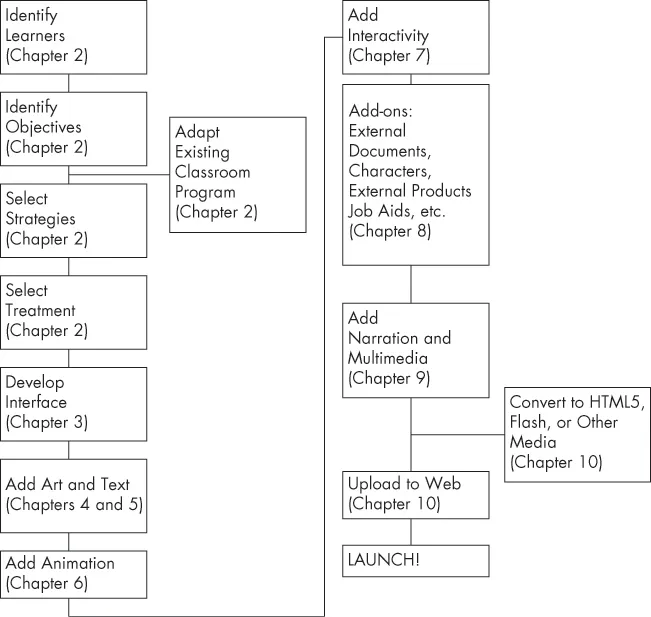
The rest of this book takes you on a step-by-step walk through the process of developing e-learning with PowerPoint. The chart below provides an overview of the basic process for creating an e-learning program with PowerPoint, while Table 1.1 offers a checklist (there’s a printable version on the website for this book) of the process in more detail.
image
Chart 1.1. Process Overview
image
image
Table 1.1. Development Checklist
image
Identify your learners.
image
Determine objectives.
image
Adapt existing classroom program (if applicable).
image
Choose strategies.
image
Choose treatment.
image
Create main file folder and subfolders for images, media, etc.
image
Develop the storyboard.
image
Create graphic user interface (GUI) and slide and title masters.
image
Include “how to use this program” information for new learners.
image
Add art and text.
image
Add animation.
image
Add interactivity.
image
Add narration and multimedia.
image
Save everything!
image
Add other elements: documents, characters, external quizzes and sites, pre- and post-work, “blended” components, job aids
image
Add a site map
image
Save everything!
image
Convert to Flash, HTML5, MP4, or other medium (optional).
image
Upload to web or LMS.
image
Test.
image
Launch.
image
The website offers narrated explanations, “you try” tutorials, examples of items like working animations and interactions, and templates for game design.

Versions

Many basics of PowerPoint have remained the same over time. Perhaps the biggest change came with the release of PowerPoint 2007, which introduced the new “ribbon” interface. Even this meant finding the new locations for familiar tools, rather than learning all the commands from scratch. PowerPoint 2010 brought some changes to authoring and version control, ability to export as a WMV video file, easy means of inserting a video with player controls, a change in how audio was edited, and a few enhancements to art capabilities.
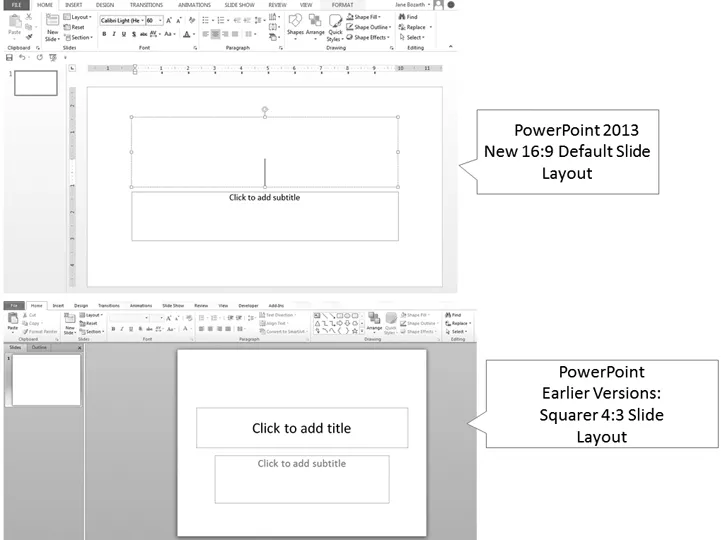
The biggest visible change to PowerPoint 2013 is the new default widescreen 16:9 ratio, shown in Figure 1.8. It’s more appropriate for newer laptops and many devices, thus creating slides now more rectangular than square (At this time, though, the old 4:3 format still ideally fits the iPad.).
Figure 1.8. New 16:9 Default Screen Ratio in PowerPoint 2013
image
While this change makes sense, it’s going to bring challenges to PowerPoint users. For one thing, old slides won’t just “work” as they usually do across other versions of PowerPoint. Importing old presentations will result in a stretched look as images, text, and background are pulled to fit the rectangular frame. You can reset the slide to the old format b...
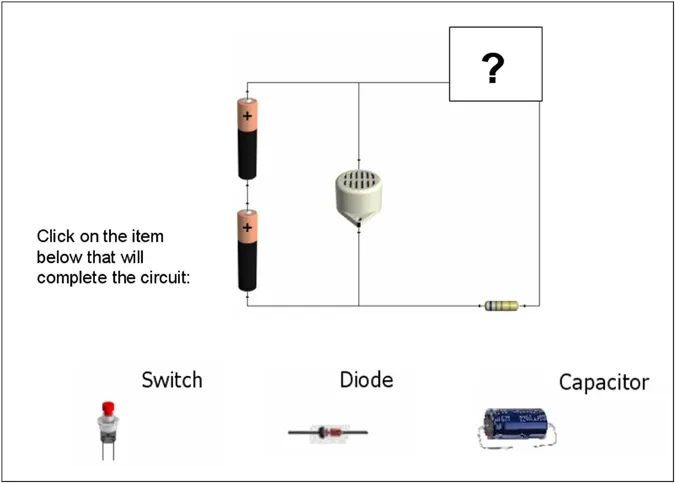
Table of contents

  1. Cover
  2. Contents
  3. Title
  4. Copyright
  5. Website Contents
  6. List of Figures and Tables
  7. Acknowledgments
  8. Introduction
  9. Section 1: Foundations
  10. Section 2: Interface and Content
  11. Section 3: Delivery and Support
  12. Appendix: PowerPoint Basics
  13. References and Other Sources
  14. Other Resources
  15. Index
  16. About the Author