![]()
CHAPTER 1
eNewsletters
E-mail newsletters (eNewsletters) are a valuable, cost-effective way to keep your school at the top of your target audience’s mind. Having a quick and easy means of communicating with parents, community members, and donors on a regular basis will save you time, money, and trees. An eNewsletter service allows you to use templates; customize content; add social media links; and track views, opens, and forwards. Such services as Constant Contact and MailChimp simplify your eNewsletter strategy with tools for design, contact management, user tracking, eNewsletter archiving, and collecting e-mail addresses. Topics covered in this chapter include
- How eNewsletters work
- Ongoing social engagement with eNewsletters
- Common school tasks before and after eNewsletters
- Best practices for eNewsletters
- Getting started with eNewsletters
HOW ENEWSLETTERS WORK
Although you may be quite familiar with e-mail, you will find that eNewsletters work a bit differently than traditional e-mail. This section outlines six steps in the eNewsletter process, including collecting your contact list, writing the eNewsletter, sending the eNewsletter, tracking interactions, resending the eNewsletter, and archiving content. These steps are followed by a discussion of the advantages posed by eNewsletters over traditional paper-based newsletters.
1. Collecting your contact list. Collect the e-mail addresses and contact information of the people with whom you wish to communicate. When writing an eNewsletter, the more information you have about the recipient, the more customized your message can be. At the very least you should collect the first name, last name, e-mail address, and school name of your intended recipients.
2. Writing the eNewsletter. The second step when using eNewsletters is to write the content. Approach an eNewsletter more like a traditional newsletter than an e-mail, including short, targeted articles sharing specific information.
3. Sending the eNewsletter. Sending an eNewsletter entails a bit more than sending a traditional e-mail. You can schedule your eNewsletter to be sent at a specific time on a specific date. You could write several messages and have them automatically sent out over a few days. You can send one version of the eNewsletter to a subsection of your list, for example parents, and another version to the rest of your list. Some tools, such as MailChimp, even offer intelligent interaction testing; this measures the effectiveness of two versions of an eNewsletter and, after a short testing period, sends out the winning version to the majority of your list.
4. Tracking interactions. eNewsletters offer the ability to track recipients’ interaction with your message. You’ll be able to see which individuals have received the eNewsletter, who opened it, who clicked it, where they clicked, what they did after they clicked, and who forwarded your message.
5. Resending the eNewsletter. Based on the tracking features, eNewsletter services allow you to resend the content to your recipients who didn’t open your e-mail the first time. As most people today are inundated with a massive number of e-mails, your message may have been lost in their inbox. Often simply sending the e-mail at a more opportune time can drastically increase your response rates. eNewsletter services even help you see when your e-mails are opened, allowing you to better schedule mailings in the future.
6. Archiving content. Another great feature of eNewsletters is the ability to archive messages. Your community will be able to read previously sent eNewsletters without your having to post them on your website. An eNewsletter archive can assist you in ensuring that your community has access to any information they may have missed.
eNewsletters feature several key advantages over traditional paper-based newsletters, or compared to standard e-mail programs. These advantages include that they are digital, customizable, and intelligent.
Digital
The first key advantage that eNewsletters have over traditional paper-based newsletters is that they are digital. eNewsletters save time and money by allowing for multiple authors and enabling reusable content. eNewsletters are sent digitally, saving you the cost of paper, copies, and stamps. Because they are scheduled and sent out automatically, you no longer need to worry about adhering address labels, stuffing envelopes, or handing packets out to classes. Multiple users at your school can log in to the eNewsletter service and update their section of the eNewsletter. This can help improve the work flow and ensures that all important information is shared in one single, unified communication from the school. You can also reuse and repurpose previously sent eNewsletters by simply updating the content for a new mailing. Reusing sections of prior eNewsletters saves you time and helps to remind the community about upcoming events.
eNewsletter services are also simple to learn and to use. With a wealth of training materials, including screenshot videos, available online, learning how to navigate and use an eNewsletter service is easier than ever. Finally, eNewsletter services even offer mobile applications. For example, Constant Contact has an iPhone application. You can use the app to create and send eNewsletters, track the number of opens and clicks, and access contact information on the go.
Ron Koehler, president of the National School Public Relations Association, explains, “Consumer needs are changing. The backpack folder is no longer the primary source of information for parents. They want and prefer instant electronic information.”
“National Survey Pinpoints Communication Preferences in School Communication,” accessed December 3, 2011, www.nspra.org/files/docs/Release%20on%20CAP%20Survey.pdf.
Customizable
Another major advantage of eNewsletter services is that they are fully customizable. First, eNewsletter services provide professionally designed templates that you can customize. With simple drag-and-drop features, creating an attractive eNewsletter is effortless. Second, using built-in design tools, you can create beautifully designed, custom eNewsletters in only a few minutes with little computer experience. Adding pictures and changing fonts is very simple with modern eNewsletter tools. You can even embed video content into your eNewsletter to make it particularly engaging. Finally, eNewsletter services allow you to insert form fields that are automatically populated with user data in the final version of the message. For example, you would add the code <first name> to the welcome message, and when the recipient reads the e-mail, it says “Dear Jennifer” or “Dear Matthew.” eNewsletters offer a personalized experience, from built-in templates and design tools to the ability to use form fields, far superior to anything that a standard paper-based newsletter could offer.
Intelligent
The greatest advantage of eNewsletters is the data. There is power in understanding who your target audience is, how segments of your audience interact with your eNewsletter, and how your message is being received. You can target each segment of your intended audience by using the contact management features. Start by uploading your e-mail database as a custom list, categorizing your audience segments as parents, students, community volunteers, potential teachers, and so on. Target each group individually with a message that is relevant to them, and choose which list will receive which particular message.
Thanks to interaction tracking, when you send an eNewsletter to your school community you can see how people have interacted with it. With a traditional newsletter, you have no idea what happens to it. Was it read, thrown away, brought home, left in a backpack, or even handed out in class? An eNewsletter service reports data to you, allowing you to see exactly how many people received the eNewsletter, and how many people opened it, clicked it, deleted it, forwarded it, and unsubscribed from it. Understanding how your audience interacts with your eNewsletter is a powerful tool for engaging your school community. eNewsletter services offer intelligent interaction testing, whereby you can simultaneously test two eNewsletters to measure their effectiveness with a small group. The eNewsletter with the most opens or clicks will then be automatically sent out to the rest of the group. This helps ensure that the most effective message reaches the largest audience.
In terms of scheduling, you are able to specify the exact date and time that an eNewsletter is to be delivered. Being able to do this can dramatically increase open rates and click-through rates. From my experience, sending your eNewsletter at Tuesday at 9:00 a.m. and Thursday at 3:00 p.m. seems to yield the highest number of opens. Finally, eNewsletter services offer a customizable sign-up box for your website or blog, allowing your community members to simply add their information and automatically subscribe to your eNewsletter.
ONGOING SOCIAL ENGAGEMENT WITH ENEWSLETTERS
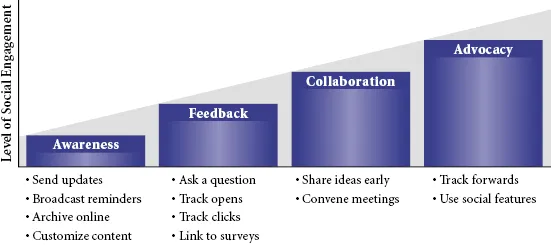
eNewsletters can help build ongoing social engagement online because they increase awareness, allow your school community to easily provide feedback, enable collaboration, and encourage people to advocate for your school (see Figure 1.1).
Awareness
By sending out relevant content about upcoming events, such as parent-teacher night, student showcase night, a sports game, or a school play, you can help build awareness across your school community. Features including an “add to my calendar” button allow your community to take your content and plug it into their existing scheduling system.
Feedback
eNewsletters also allow for feedback from your audience. When you ask a question in your eNewsletter, there are several ways to receive feedback. You could have a vote, asking a simple yes-no question. Readers click one link for “yes” or another link for “no.” You can track the number of clicks to see how many people agreed and how many people disagreed. You can have a link to a comment box, in which readers post a comment to send to you. You can also integrate an online survey platform, enabling readers to give authentic feedback.
Kisu Kuroneko, a seventh- and eighth-grade teacher in Ontario, Canada, explains, “We publish the content of the newsletter as individual posts on the school website. This means that our school community can subscribe to our school website feed and automatically receive updates whenever we add information to the school site.”
“WordPress Plug-Ins We Use on Our School Website,” posted January 31, 2009, http://blog.classroomteacher.ca/209/wordpress-plugins-we-use-on-our-school-website/#create-an-enewsletter-for-your-school.
Collaboration
eNewsletters provide an opportunity for collaboration with your school community. By sending out information or polling your community, you are inviting them to get involved by sending their feedback and their ideas. Allow this feedback to be the beginning of a conversation. Use your eNewsletter to keep parents engaged in that conversation by sharing progress on putting their ideas into action.
Advocacy
eNewsletters are a great tool to h...