![]()
CHAPTER 1
Life Cycle of Game Audio
Florian Füsslin
Crytek GmbH, Frankfrut, Germany
CONTENTS
1.1 PREAMBLE
Two years have passed since I had the pleasure and opportunity to contribute to this book series—two years in which game audio has made another leap forward, both creatively and technically. Key contributors and important components to this leap are the audio middleware software companies and their design tools, which continue to shift power from audio programmers to audio designers. But as always, with great power comes great responsibility, so a structured approach to audio design and implementation has never been more important. This chapter will provide ideas, insight, and overview of the audio production cycle from an audio designer’s perspective.
1.2 AUDIO LIFE CYCLE OVERVIEW
“In the beginning, there was nothing.” This pithy biblical phrase describes the start of a game project. Unlike linear media, there are no sound effects or dialog recorded on set we can use as a starting point. This silence is a bleak starting point, and it does not look better on the technical side. We might have a game engine running with an audio middleware, but we still need to create AudioEntity components, set GameConditions, and define GameParameters.
In this vacuum, it can be hard to determine where to start. Ideally, audio is part of a project from day one and is a strong contributor to the game’s overall vision, so it makes sense to follow the production phases of a project and tailor it for our audio requirements. Game production is usually divided in three phases: preproduction, production, and postproduction. The milestone at the end of each phase functions as the quality gate to continue the development.
Preproduction → Milestone First Playable (Vertical Slice)
Production → Milestone Alpha (Content Complete)
Postproduction → Milestone Beta (Content Finalized)
The ultimate goal of this process is to build and achieve the audio vision alongside the project with as little throwaway work as possible. The current generation of game engines and audio middleware software cater to this requirement. Their architecture allows changing, iterating, extending, and adapting the audio easily, often in real time with the game and audio middleware connected over the network.
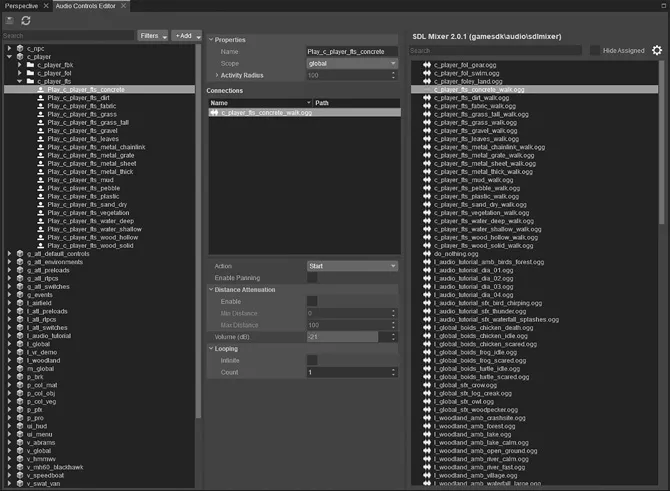
All of these tools treat the audio content and the audio structure separately. So, instead of playing back an audio file directly, the game triggers a container (e.g., AudioEvent) which holds the specific AudioAssets and all relevant information about its playback behavior such as volume, positioning, pitch, or other parameters we would like to control in real time. This abstraction layer allows to change the event data (e.g., how a sound attenuates over distance) without touching the audio data (e.g., the actual audio asset) and vice versa. We talk about a data-driven system where the audio container provides all the necessary components to play back in the game engine. Figure 1.1 shows how this works with the audio controls editor in CryEngine.
In CryEngine, we are using an AudioControlsEditor, which functions like a patch bay where all parameters, actions, and events from the game are listed and communicated. Once we create a connection and wire the respective parameter, action, or event to the one on the audio middleware side, this established link can often remain for the rest of the production while we continue to tweak and change the underlying values and assets.
FIGURE 1.1 The audio controls editor in CryEngine.
1.2.1 Audio Asset Naming Convention
Staying on top of a hundred AudioControls, several hundred AudioEvents, and thousands of containing AudioAssets requires a fair amount of discipline and a solid naming convention. We try to keep the naming consistent throughout the pipeline. So the name of the AudioTrigger represents the name of the AudioEvent (which in turn reflects the name of the AudioAssets it uses), along with the behavior (e.g., Start/Stop of an AudioEvent). With the use of one letter identifier (e.g., w_ for weapon) and abbreviation to keep the filename length in check (e.g., pro_ for projectile), we are able to keep a solid overview of the audio content of our projects.
1.2.2 Audio Asset Production
In general, the production chain of an audio event follows three stages:
Create audio asset
An audio source recorded with a microphone or taken from an existing library, edited and processed in a DAW, and exported into the appropriate format (e.g., boss_music_stinger.wav, 24 bit, 48 kHz, mono).
Create audio event
An exported audio asset implemented into the audio middleware in a way a game engine can execute it (e.g., Play_Boss_Music_Stinger)
Create audio trigger
An in-game entity which triggers the audio event (e.g., “Player enters area trigger of boss arena”).
While this sequence of procedures is basically true, the complex and occasionally chaotic nature of game production often requires deviating from this linear pipeline. We can, therefore, think of this chain as an endless circle, where starting from the audio trigger makes designing the audio event and audio asset much easier. The more we know about how our sound is supposed to play out in the end, the more granular and exact we can design the assets to cater for it.
For example, we designed, exported, and implemented a deep drum sound plus a cymbal for our music stinger when the player enters the boss arena. While testing the first implementation in the game, we realized that the stinger happens at the same moment that the boss does its loud scream. While there are many solutions such as delaying the scream until the stinger has worn off, we decided to redesign the asset and get rid of the cymbal to not interfere with the frequency spectrum of the scream to begin with.
1.3 PREPRODUCTION
1.3.1 Concept and Discovery Phase—Let’s Keep Our Finger on the Pulse!
Even in the early stages of development, there are determining factors that help us to define the technical requirements, choose the audio palette, and draft the style of the audio language. For example, the genre (shooter, RTS, adventure game), the number of players (single player, small-scale multiplayer, MMO), the perspective (first-person, third-person), or the setting (sci-fi, fantasy, urban) will all contribute to the choices that you will be making.
Because we might not have a game running yet, we have to think about alternative ways to prototype. We want to get as much information about the project as possible, and we can find a lot of valuable material by looking at other disciplines.
For example, our visually-focused colleagues use concept art sketches as a first draft to envision the mood, look, and feel of the game world. Concept art provides an excellent foundation to determine the requirements for the environment, character movement, setting, and aesthetic.
Similarly, our narrative friends have documents outlining the story, timeline, and main characters. These documents help to envision the story arc, characters’ motivations, language, voice, and dialog requirements. Some studios will put together moving pictures or video reels from snippets of the existing concept art or from other media, which gives us an idea about pacing, tension, and relief. These cues provide a great foundation for music requirements.
Combining all this available information should grant us enough material to structure and document the project in audio modules, and to set the audio quality bar.
1.3.2 Audio Modules
Audio modules function both as documentation and as a structural hub. While the user perceives audio as one experience, we like to split it in the three big pillars to manage the production: dialog, sound effects, and music. In many games, most of the work is required on the sound effects side, so a more granular structure with audio modules helps to stay on top. Development teams usually work cross-discipline and therefore tend to structure their work in features, level sections, characters, or missions, which is not necessarily in line how we want to structure the audio project.
Here are some examples of audio modules we usually create in an online wiki format and update as we move through the production stages:
Cast—characters and AI-related information
Player—player-relevant information
Levels—missions and the game world
Environment—possible player interactions with the game world
Equipment—tools and gadgets of the game characters
Interface—HUD-related requirements
Music—music-relevant information
Mix—mixing-related information
Each module has subsections containing a brief overview on the creative vision, a collection of examples and references, technical setup for creating the content, and a list of current issues.
1.3.3 The Audio Quality Bar
The audio quality bar functions as the anchor point for the audio vision. We want to give a preview how the final game is going to sound. We usually achieve this by creating an audio play based on the available information, ideally featuring each audio module.
Staying within a linear format, utilizing the DAW, we can draw from the full palette of audio tools, effects, and plugins to simulate pretty much any acoustic behavior. This audio play serves three purposes: First, it creates an audible basis for the game to discuss all audio requirements f...