This chapter introduces many of the fundamental concepts of computing using examples from turtle graphics.
Programmable software is what makes a computer a powerful tool. Each different program essentially “rewires” the computer to allow it to perform a different task. By following this text, you will learn basic principles of writing software in the Python programming language.
Python is a popular scripting language available as a free download from www.python.org. Follow the instructions given there to install the latest production version of Python 3 on your system. All examples in this text were written with Python 3.6.
The CPU and RAM
In order to write software, it will be helpful to imagine what happens inside the computer when a program runs. We begin with a rough picture and gradually fill in details along the way.
When a program is ready to run, it is loaded into RAM, usually from long-term storage such as a network drive or flash drive. RAM is an acronym for random access memory, which is the working memory of a computer. RAM is volatile, meaning that it requires electricity to maintain its contents.
Once a program is loaded into RAM, the CPU, or central processing unit, executes the instructions of the program, one at a time. Each CPU family has its own instruction set, and you might be surprised at how limited these instruction sets are. Most instructions boil down to one of a few simple types: load data, perform arithmetic, make comparisons, and store data. It is amazing that these small steps can be combined in so many different ways to build software that is incredibly diverse and complex.
Computer Languages
CPU instruction sets are also known as machine languages. The key point to remember about machine languages is that in order to be run by a CPU, a program must be written in the machine language of that CPU. Unfortunately, machine languages are not meant to be read or written by humans. They are really just specific sequences of bits in memory. (We will explain bits later if you are not sure what they are.)
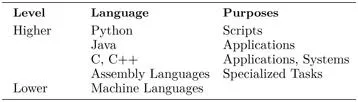
Because of this, people usually write software in a higher-level language, in the sense of Table 1.1. This ordering is not meant to be precise, but, for example, most programmers would agree that C and C++ are closer to the machine than Python.
TABLE 1.1 Programming language hierarchy
Compilation and Interpretation
Now if CPUs can only run programs written in their own machine language, how do we run programs written in Python, Java, or C++? The answer is that the programs are translated into machine language first.
There are two main types of translation: compilation and interpretation. When a program is compiled, it is completely translated into machine language to produce an executable file. C and C++ programs are usually compiled, and most applications you normally run have been compiled. In fact, many companies only distribute compiled executables: unless a project is open source, you do not have access to the uncompiled source code.
On the other hand, when a program is interpreted, it is translated “on-the-fly.” No separate executable file is created. Instead, the translator program (the interpreter) translates your program so that the CPU can execute it. Python programs are usually interpreted.
The Python Interpreter
When you start Python, you are in immediate contact with a Python interpreter. If you provide it with valid Python, the interpreter will translate your code so that it can be executed by the CPU. The interpreter displays the version of Python it was written for, and then shows that it is ready for your input with a “
the interpreter will respond accordingly. Try it and see.
Remember that if you are not sure what something will do in Python, you can always try it out in the interpreter without having to write a complete program. Experiment—the interpreter will not mind.
A Python Program
That said, our focus will be on writ...