Section 1 – Our First Level
In this section, you will learn about the fundamental concepts of Unity, such as scene creation and asset management, to create your first playable prototype game level.
This section comprises the following chapters:
- Chapter 1, Designing a Game from Scratch
- Chapter 2, Setting Up Unity
- Chapter 3, Working with Scenes and Game Objects
- Chapter 4, Grayboxing with Terrain and ProBuilder
- Chapter 5, Importing and Integrating Assets
Chapter 1: Designing a Game from Scratch
Welcome to the first chapter of the book! I am sure you are as super excited as I am to start this amazing journey into game development with Unity. We will be approaching game development in four parts. First, we will be talking about the basics of game development, looking at topics such as how to design your game before you start coding, and then we will prototype a simple first level using Unity. Then, we will dive into graphics to explore the look and feel of a good game. Later, we will learn how to get everything moving through the use of scripting. Finally, we will see how you can finish and publish your game. As you go through the chapters, you will apply every concept to a full game project, so you will end the book with a fully functional shooter game.
In this chapter, we will design our game, Super Shooter. This phase is known as pre-production, where we will create a development plan. Our game design will include all the functionality we want in our game: the player character, the non-player characters, game assets, animations, and more. We will also use screen mock-ups to document our game's design. We will look at related concepts regarding the use of Unity for our game along the way. We will be discussing which pieces of documentation are necessary for all design work we will be doing throughout this chapter.
Specifically, we will examine the following concepts in this chapter:
- Game concept
- Game characters
- Gameplay
- The difficulty balance
- Documentation
Game concept
Why not just start developing our game instead of designing it? This question is spawned from the excitement of developing games, especially with the Unity game engine. All games start with an idea. That idea is translated into a design, and that design is the basis for development and, eventually, the final game.
A game's design is like a blueprint for a house. You would not consider building a house without a blueprint, and it is an equally bad idea to develop a game without designing it first. The reason for this is to save time and frustration. For larger projects, time wasted also means unnecessary funds are expended.
Imagine that you employed a project team of 12 developers, animators, and artists. If you shared your game idea, would they have enough information to go on? Would they create a great game, but not the game you had in mind? All we are doing with our game design is documenting as much as we can in the beginning so that the development process is purposeful. Without question, you will continually modify your game's design during development, so having a strong base from which to start is critical to your success.
Our game design will serve as the foundation for the look of our game, what the player's objectives are, what the gameplay will be, supporting user actions, animations, audio, Artificial Intelligence (AI), and victory conditions. That is a lot to think about and underscores the importance of translating the game idea into the game design.
Throughout the book, we will be covering a range of components. However, in this section, we will cover those that appear in the following list:
- Game idea
- Input controls
- Winning and losing
So, let's look at each component in more detail.
Game idea
The basic concept of our Super Shooter game is that it will be a 3D game featuring a Futuristic Hero Soldier as the player character. The character must fight against Enemy Soldiers, who are intent on destroying our Hero's base and anyone that gets in their way, including our Hero.
Here is an image of what our game will look like:
Figure 1.1 – Our hero shooting bullets at enemies
Now that we have a general idea of what the game is going to be, let's talk about how the player will control the character.
Input controls
It is important to consider how players will interact with our game. Players have an expectation that the industry norms for user controls will be implemented in games, which is why, for our example, the player will control our Hero using the standard set of controls.
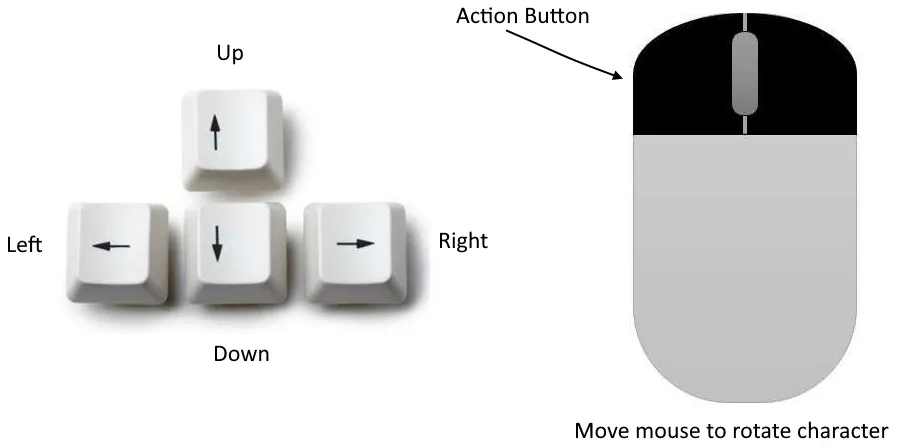
Our default set of user input controls, as shown in the following figure, will consist of the keyboard and mouse:
Figure 1.2 – Controls scheme
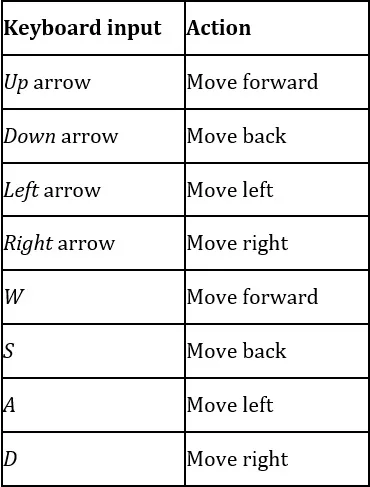
We will configure and program our game so that user input from the keyboard matches the key and action pairings shown in the following table:
Figure 1.3 – Key mapping
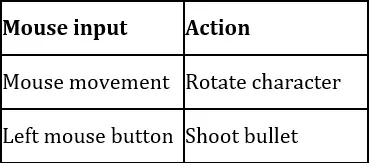
The mouse will also be a significant source of user input. We will implement two components using the mouse, as indicated in the following table:
Figure 1.4 – Mouse mapping
The left mouse button will be our action button to shoot bullets, while the horizontal mouse motion will allow us to rotate our character and face the enemies. As all enemies and the player are going to be moving across a flat surface, it is not necessary to move the camera up and down.
That's how we handle input, but we also need to end the game session at some point! Let's talk about how the player will win and lose.
Winning and losing
Our winning condition will be when all the Enemy waves have been eliminated.
There will be two different ways the player can lose the game:
- The first losing condition is when the base life becomes 0.
- The second losing condition is if the Hero's life becomes 0.
From this short description, you can tell that there will be several things to keep track of, including the following:
- The number of remaining Waves
- The health of the Player's Base
- The health of our Hero
Now that we have defined what is called the game's core loop (start a level, play it, win/lose it, repeat), let's dive deeper into the specific details, starting with our characters.
Game characters
Our game will feature several objects, but only two game characters. The first game character is our Hero and will be controlled by the player. The second type of game character is the Enemies. They are non-player characters that are controlled by AI. Let's look more closely at both of these characters.
Hero
The player will play our game as the Hero, our game's protagonist. So, what can our Hero player character do? We already know we will be able to move them throughout our game environment using a combination of keyboard and mouse inputs. We also know that the left mouse button—our action button—will cause them to shoot bullets.
Important note
Because the Hero is controlled by a human player, it is referred to as the Player Character.
We will implement the following animations for the Hero:
- Idle: This animation will play when the character is not being mov...