There was a time where if someone wanted to do business with you they had to try to get your attention through direct mail, telemarketing or face-to-face.The problem? Most of the time these marketing methods were completely unsolicited - they were "push, " as marketers pushed information to consumers. As a result, we often refer to these solicitations in a negative way and respond angrily. We use terms like: 'Junk Mail''Harassment''Snake Oil'So how is email marketing different?The major difference between email marketing and the other marketing methods is that people opt-in – or choose – to receive your marketing message. This is GOLDEN.It's like an open-door invitation to share your information and expertise with your customers. That, my friend, is something you just can't pay for.Convinced it's time to pay attention to email marketing? Then let's talk about where to start. In this report you're going to learn everything you need to know about starting your first email list with one of the most popular and best email software programs on the internet: Aweber.In this report we'll cover: 1. What Is an Email List?2. How Do You Get Subscribers?3. Why Build an Email List?4. Why Use Aweber For Email Marketing?5. HTML or Text Messages or Both?6. How to Set up Your List & Opt-in Form in Aweber 7. How to Set Up an Autoresponder in Aweber8. How to Send a Broadcast in Aweber 9. How to Set up a Blog Broadcast in Aweber 10. Finding Targeted and Interested Subscribers 11. The Rules & Laws Around Col ecting Email Addresses 12. Email Marketing Statistics13. Show Me The Money - How to Make Money With Your Email List 3Recommendation: You'l get the greatest value from this report if you fol ow along in real time as we discuss these topics. Even better -- you can sign up for a trial that gives you Aweber access for 30 days for only $1. Grab that and learn as you go here: http://www.Aweber.comJust click 'order' and you'll see this: All signed up and ready to go? Great! Let's get started.
- 49 pages
- English
- ePUB (mobile friendly)
- Available on iOS & Android
eBook - ePub
Aweber Marketing Tips
About this book
How to Set Up Your Email List and Opt-In Form in Aweber
In this section we're going to go through setting up your email list and opt-in form in Aweber.
Step 1: Set up your email list
After you log in to your Aweber account, the first thing you'll want to do is click on the
'Create and Manage Accounts' button. It looks like this: Then you'l need to click 'Create a New List' on the next screen: Next, there are three sections for you to fil out:
- Basic Settings
- Personalize Your List
- Confirmed Opt-In
On the Basic Settings Page you'll find the following:
- List Name
- List Description
- 'From' Name
- Address
Notification Emails – If you want to get an email every time someone signs up to your list, enter your email address and name here. This may seem like a great idea, but you might soon be overwhelmed with opt-ins. If you choose to receive notification, I recommend setting up a separate file folder in your mailbox where these emails are automatical y sent so they aren’t cluttering up your in box.
On the Company Branding Page you'll find:
1. Company Branding
Company Name
Website URL
Email Signature – This can be automatical y added to al your emails.
2. Social Media/Sharing
Tweet Your Broadcasts
Share Broadcasts on Facebook
Broadcast Archive – This al ows your email broadcasts to be archived on Aweber's website so you can direct people to view past archived issues of your emails or newsletters.
3. Global Text Snippets
This is another great feature of Aweber where you can set certain 'snippets'. For example, if you want to include a business phone number in your emails you may want to set it up as a snippet. That way, if your phone number ever changes you can change the snippet and not have to go back into all your emails and change it in every spot you added your phone number. Saves you time to plan ahead!
On The Confirmed Opt-In Page You'll Find
1. You Confirmation Message
This is the message your subscribers will see before they confirm they signed up for your list. You can customize it for best results and a personal touch.
2. Require Opt-In on Web Forms
This is the double opt-in option. It is recommended you have people confirm that they signed up for your list by getting them to double opt-in.
3. Success Page
You can add a custom page for your subscribers to see after they confirm their opt-in.
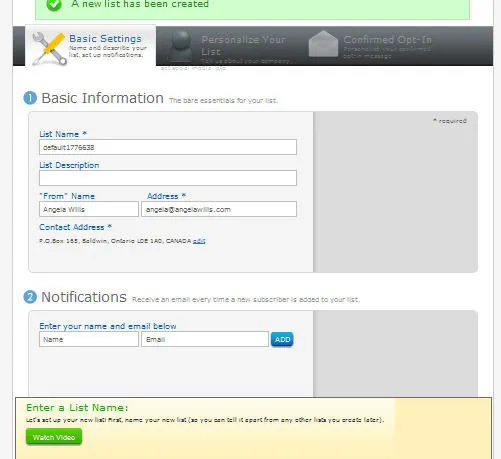
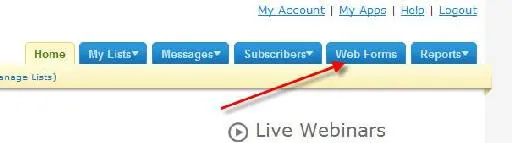
Make sure you fill out each section according to the instructions and then press the save button at the bottom of each page.
Next, you need to create a web form. Click the button that says 'Web Form': Click the 'Create a New Web Form' Button:

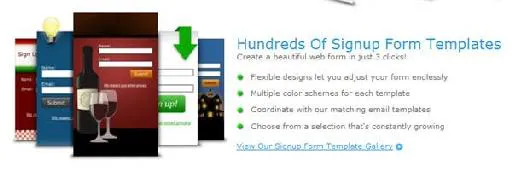
Now the fun starts! There are many options to choose from. Aweber has templates that would suit many different businesses. For example there are ready-made forms for people in the weight-loss, sports, pets, real estate, consulting and more.
Scan through the categories and choose your template.
Then you can use the easy editor to add text, effects, change colors and customize the form.
As usual, make sure you save the form. Click the green 'Save Web Form' button at the bottom of the screen once you're done.
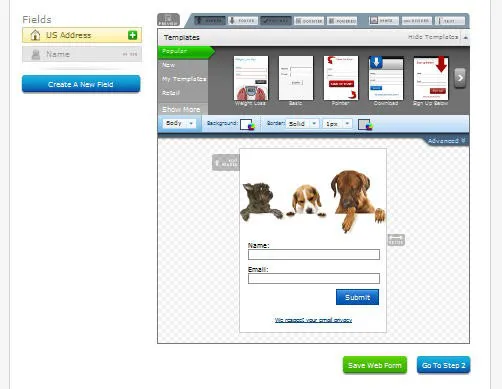
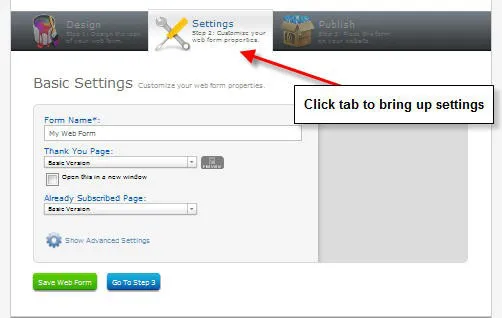
Once you've saved the web form, click on the 'Settings' tab at the top of the page and fill out the basic information such as; Form Name, Thank You Page & Already Subscribed Page.
Again, click the green 'Save Web form' button.
Now you're ready to add the form to your website! Click the 'Publish' tab on the page to get your code. This section allows for three options:
1. I Wil Install My Form
2. My Website Designer Wil Install My Web Form 3. Have Aweber Host My Form
Option 1 – This option al ows you to grab coding and paste it wherever you can add HTML.
Option 2 – This option al ows you to simply send your web designer an email with the code to add for you.
Option 3 – This is a neat option where Aweber will actually host the web form on their site. It makes for a quick way to get a web form ready to accept sign-ups. The great thing about this is you can easily build your email list, even if you don't yet have a website!
There you have it. Fol ow the steps in this section and you will have your first email list set up and your opt-in form ready to collect subscribers.
Before you go to much further, you'l want to add a welcome email for your subscribers by clicking on the 'Messages' tab and adding a 'Follow-Up' email.
Not sure how? No worries! Just read the next section for instructions on how to set up your autoresponders, broadcasts and blog broadcasts in Aweber.
How to Set Up an Autoresponder in Aweber
Autoresponders are email messages that are pre-set to go out at certain time intervals. For example, you could set them to go out daily, or weekly, or monthly, etc.
In the previous section I showed you how to set up your email list and opt-in form.
Now once people get onto your list you'll want them to receive a nice, warm welcome message. This message will go out automatically upon signup. This is called an autoresponder.
Here's how to set up your first autoresponder message in Aweber:
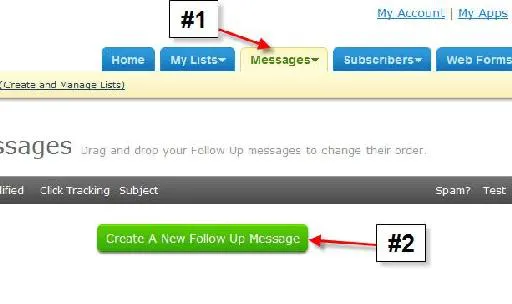
1. Click on the 'Message' tab across the top of the screen.
2. Click on 'Create a New Fol ow Up Message'.
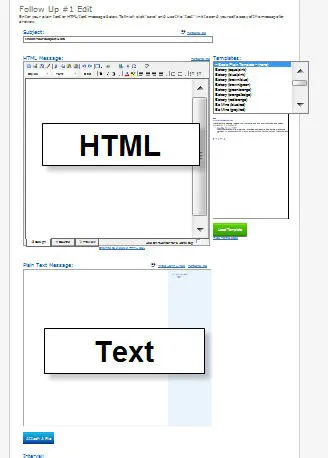
Next, you'll want to fill out the appropriate section: 1. If sending HTML you'll need to fil out both the HTML and Text sections.
2. If sending Text then you'l need to leave the HTML section blank and fil out the text only.
Important sections to note:
Sp...
Table of contents
- (Sem título)
- Introduction:
- What Is Email Marketing?
- How Do You Get Email Subscribers?
- Why Build an Email List?
- Why Would You Use Aweber?
- HTML or Text Messages or Both?
- How to Set Up Your Email List and Opt-In Form in Aweber
- How to Set Up an Autoresponder in Aweber
- How to Send Out a Broadcast in Aweber
- How to Set Up Blog Broadcasts in Aweber
- Finding Targeted and Interested Subscribers
- The Rules and Laws Around Collecting Email Addresses
- Email Marketing Statistics & Reports
Trusted by 375,005 students
Access to over 1.5 million titles for a fair monthly price.
Study more efficiently using our study tools.
Frequently asked questions
Yes, you can cancel anytime from the Subscription tab in your account settings on the Perlego website. Your subscription will stay active until the end of your current billing period. Learn how to cancel your subscription
No, books cannot be downloaded as external files, such as PDFs, for use outside of Perlego. However, you can download books within the Perlego app for offline reading on mobile or tablet. Learn how to download books offline
Perlego offers two plans: Essential and Complete
- Essential is ideal for learners and professionals who enjoy exploring a wide range of subjects. Access the Essential Library with 800,000+ trusted titles and best-sellers across business, personal growth, and the humanities. Includes unlimited reading time and Standard Read Aloud voice.
- Complete: Perfect for advanced learners and researchers needing full, unrestricted access. Unlock 1.5M+ books across hundreds of subjects, including academic and specialized titles. The Complete Plan also includes advanced features like Premium Read Aloud and Research Assistant.
We are an online textbook subscription service, where you can get access to an entire online library for less than the price of a single book per month. With over 1.5 million books across 990+ topics, we’ve got you covered! Learn about our mission
Look out for the read-aloud symbol on your next book to see if you can listen to it. The read-aloud tool reads text aloud for you, highlighting the text as it is being read. You can pause it, speed it up and slow it down. Learn more about Read Aloud
Yes! You can use the Perlego app on both iOS and Android devices to read anytime, anywhere — even offline. Perfect for commutes or when you’re on the go.
Please note we cannot support devices running on iOS 13 and Android 7 or earlier. Learn more about using the app
Please note we cannot support devices running on iOS 13 and Android 7 or earlier. Learn more about using the app
Yes, you can access Aweber Marketing Tips by Luck Carvalho in PDF and/or ePUB format, as well as other popular books in Business & Marketing. We have over 1.5 million books available in our catalogue for you to explore.