Learn to shoot professional-quality HD footage with your DSLR Camera
The DSLR Filmmaker's Handbook, 2nd Edition is the expert guide to getting professional movie-making results with an HD video-enabled DSLR camera. Fully updated to reflect the latest technology, this updated edition provides guidance toward best practices and techniques that maximize results. Shooting HD video with a DSLR has many benefits — and also a few tricky drawbacks — but this guide gives you the insight and training you need to overcome these challenges as you learn what to anticipate, how to work around it, and how to fix imperfections in post-production. Award winning independent filmmaker Barry Andersson walks you through the shooting process and shows you what to do before, during, and after filming to ensure high quality results.
Most of today's DSLRs have the capacity to shoot HD video. This, combined with incredible low-light capabilities, shallow depth of field, and relatively low price point make these cameras an extremely attractive entry point for would-be independent filmmakers. This book shows you how to exploit your DSLR's capabilities to produce beautiful film, with step-by-step expert instruction.
Understand the limitations of DSLR video
Learn what to plan for before filming begins
Exploit HD capabilities to maximize the film's visuals
Produce professional-level, film-quality footage
With thorough explanations and expert instruction, The DSLR Filmmaker's Handbook, 2nd Edition is the training you need to start shooting beautiful HD footage.
Chapter One Fundamentals of DSLR Filmmaking
When choosing to shoot with DSLR cameras, you need to know some of the basics. Whether your background is with a traditional video camera, as a still photographer, or as a filmmaker, you’ll see some overlap in equipment and terms you are familiar with. However, some unique processes, gear, and workflows apply specifically to shooting video on DSLR cameras, so don’t just skip ahead and assume you know everything.
Features of DSLR Cameras
Until Nikon released the D90 in 2008, buyers had to choose between a digital still camera and a digital video camera. Filmmakers were using film or traditional video cameras for production. When the D90 and, quickly afterward, the Canon 5D Mark II were released, you finally had the ability to shoot digital stills and HD video on the same device. Since then, every major camera manufacturer has added DSLR cameras that can shoot video.
At the time, HD video on a still camera was controversial. A lot of photographers worried that improvements to the still camera would be limited because it seemed all the attention was being placed on the video side of the camera. Independent filmmakers took one look at the early footage and realized the vast potential of this new technology. HD video has been around since the 1990s but was practically available only on traditional video cameras. The design and function of traditional video cameras prevented a lot of the cinematic qualities that traditional film cameras provided.
DSLR cameras allowed filmmakers to easily and inexpensively use interchangeable lenses to craft the look of their film more like traditional filmmaking. These factors, along with an available shallow depth of field and low-light capabilities, were not available on most traditional video cameras. These issues, coupled with the price and quality of the video image, helped supersize the growth of the DSLR market.
As stated previously, since the launch of the Nikon D90 and the Canon 5D Mark II, manufacturers have released an endless string of DSLR cameras that shoot video. The still/HD video hybrid has become the norm for capturing video. You can now just compare models and find the right functions and price point for your project and start shooting.
Sensor Size
If you are not a photographer and not accustomed to dealing with sensor sizes, let’s put it in motion-picture film terms. Sensor size is a bit like choosing whether to shoot on 8 mm, 16 mm, Super 16 mm, 35 mm, Super 35 mm, or 70 mm film. Just as you would with motion-picture film stock, you choose your sensor size based on your budget, the depth of field, and the aesthetic look for your film. In general, the bigger the sensor, the more expensive the camera (just like 35 mm or 70 mm film); the smaller the sensor, the cheaper the camera. This is a generalization, because some higher-end cameras have smaller than full-frame sensors.
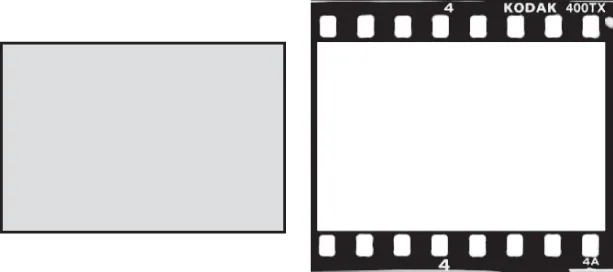
A full-frame sensor is approximately the same size as a single frame of 35 mm film from a traditional still film camera (Figure 1-1).
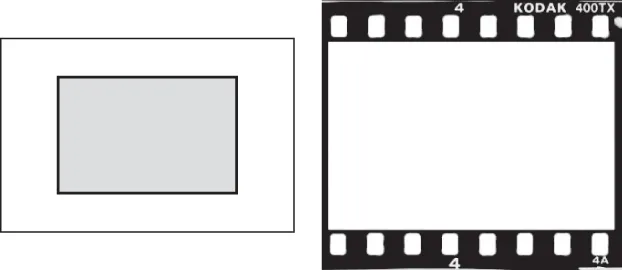
Any non-full-frame sensor is referred to as a crop sensor (Figure 1-2). These sensors vary in size but are smaller than a single frame of 35 mm film from a traditional still film camera.
Figure 1-1: A full-frame sensor and 35 mm still film are the same size; the sensor area is 36×24 mm, or 864 mm2.
Figure 1-2: A crop sensor is smaller than 35 mm film. The Canon APS-C sensor area is 22.2×14.8 mm, or 329 mm2.
The sensor size affects the “grain” in your image, the light sensitivity, and the depth of field aesthetic for that camera. At the time of this writing, there are two dominant sensor sizes: full-frame sensors and APS-C crop sensors.
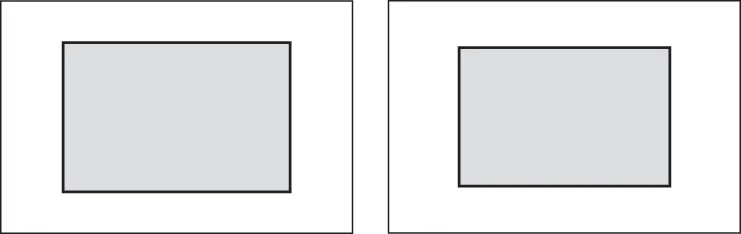
Figure 1-3: Nikon APS-C (left) vs. Canon APS-C sensor (right). The Nikon sensor is also used by Pentax and Sony. Notice that the Canon APS-C sensor is slightly smaller than the Nikon APS-C sensor.
APS-C is currently in all non-full-frame Nikon cameras and the Canon 7D Mark II, EOS 70D, and Rebel T5i. To make things slightly more confusing, there is a slight difference between the Canon APS-C and Nikon APS-C sensors (Figure 1-3): specifically, the Nikon APS-C sensor (22.2×14.8 mm, or 329 mm2) is slightly larger than the Canon version (~23.6×15.7 mm, or about 370 mm2).
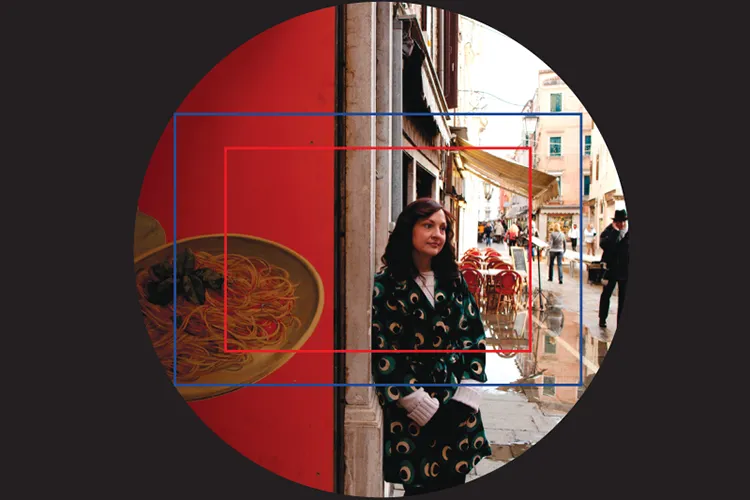
Figure 1-4: Field of view comparison between full-frame sensor (blue) and crop sensor (red)
If you are using a crop sensor, be aware of how this affects your lenses. When you’re shooting with lenses from traditional 35 mm film cameras, the field of view will not match up with the given focal length on the lens. This is due to the fact that the sensor is smaller than the area the lens would normally be filling when shooting with 35mm film or a full-frame sensor camera.
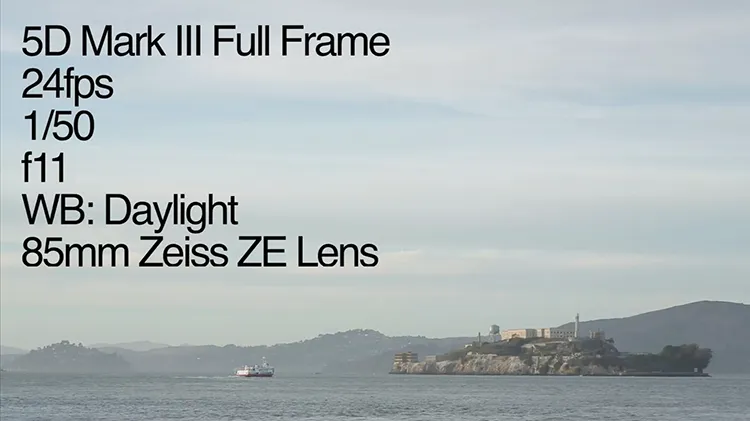
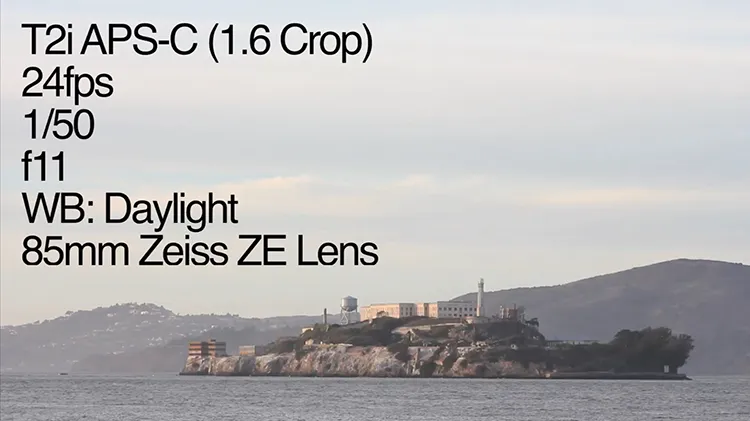
Some people say that the focal length will be changed when used on a crop-sensor camera, but that is not accurate. Standard still lenses were designed so that the field of view would cover the full frame of the 35 mm film (Figure 1-4). A crop sensor is smaller than a standard 35 mm film frame, and when a standard lens is used, the field of view is greater than what is captured on the sensor (Figure 1-5). This creates a magnification effect. For example, your 50 mm lens will have a narrower field of view. This does not in any way change the actual focal length of the lens, just how much of the area of view is captured (Figure 1-6).
Figure 1-5: Full-frame sensor captured with an 85 mm Zeiss lens
Figure 1-6: APS-C sensor in the same camera position with the same lens. Notice the magnification effect as compared to the full-frame image in the previous figure.
The various sizes of crop sensors have their own multiplication factor specific to that size of sensor; these are referred to as either the crop factor or the focal length multiplier. Specific crop factors range between 1.3 and 2 depending on the size of the sensor. The way the crop factor is determined is a simple division of the size of the sensor by a full frame. For example, a full-frame sensor is 36×24 mm, and a Canon APS-C sensor is 22.3×14.9 mm. Dividing 36 by 22.3, we get 1.614, which we round to 1.6. If you are using a standard 24 mm wide-angle le...
Table of contents
Cover
Titlepage
Copyright
Credits
Dedication
Acknowledgments
About the Author
Introduction
Chapter One: Fundamentals of DSLR Filmmaking
Chapter Two: Gear and Recommendations
Chapter Three: Testing and Custom Settings
Chapter Four: Cameras and Lenses on Location
Chapter Five: Camera Motion and Support
Chapter Six: Lighting on Location
Chapter Seven: Sound on Location
Chapter Eight: Organizing and Storing Data in the Field
Chapter Nine: Troubleshooting
Chapter Ten: Converting and Editing Your Footage
Chapter Eleven: Audio Crash Course
Chapter Twelve: Color Correction and Grading
Chapter Thirteen: Compressing Your Film
Chapter Fourteen: Post-Production Looks
Chapter Fifteen: Workshops
End-User License Agreement
Trusted by 375,005 students
Access to over 1.5 million titles for a fair monthly price.
Yes, you can cancel anytime from the Subscription tab in your account settings on the Perlego website. Your subscription will stay active until the end of your current billing period. Learn how to cancel your subscription
No, books cannot be downloaded as external files, such as PDFs, for use outside of Perlego. However, you can download books within the Perlego app for offline reading on mobile or tablet. Learn how to download books offline
Perlego offers two plans: Essential and Complete
Essential is ideal for learners and professionals who enjoy exploring a wide range of subjects. Access the Essential Library with 800,000+ trusted titles and best-sellers across business, personal growth, and the humanities. Includes unlimited reading time and Standard Read Aloud voice.
Complete: Perfect for advanced learners and researchers needing full, unrestricted access. Unlock 1.5M+ books across hundreds of subjects, including academic and specialized titles. The Complete Plan also includes advanced features like Premium Read Aloud and Research Assistant.
Both plans are available with monthly, semester, or annual billing cycles.
We are an online textbook subscription service, where you can get access to an entire online library for less than the price of a single book per month. With over 1.5 million books across 990+ topics, we’ve got you covered! Learn about our mission
Look out for the read-aloud symbol on your next book to see if you can listen to it. The read-aloud tool reads text aloud for you, highlighting the text as it is being read. You can pause it, speed it up and slow it down. Learn more about Read Aloud
Yes! You can use the Perlego app on both iOS and Android devices to read anytime, anywhere — even offline. Perfect for commutes or when you’re on the go. Please note we cannot support devices running on iOS 13 and Android 7 or earlier. Learn more about using the app
Yes, you can access The DSLR Filmmaker's Handbook by Barry Andersson in PDF and/or ePUB format, as well as other popular books in Media & Performing Arts & Digital Media. We have over 1.5 million books available in our catalogue for you to explore.